Platform concepts
In this guide, the basic concepts of the Timefold Platform are explained.
High-level architecture
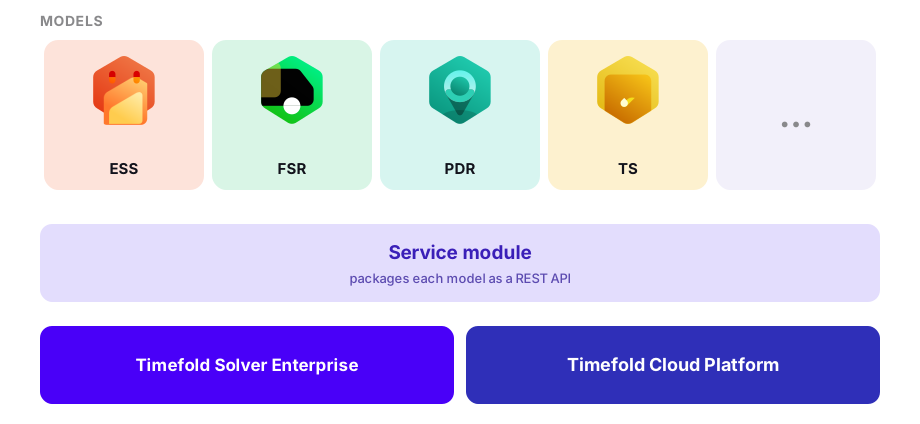
The diagram below shows how the different components of Timefold fit together to solve your planning problem.
-
Models: Each of the Timefold models solve a specific type of planning problem. You can use one or more of the expert-built models.
-
Service module: The service module is part of the Timefold Solver. It packages a model as a container with a REST API that the platform can deploy, scale, and call.
-
Timefold Solver Enterprise: This is the Enterprise version of the Timefold Solver tasked to find the most optimal solution possible.
-
Timefold Cloud Platform: This is the infrastructure that hosts and scales the model containers, coordinates solving planning problems, and adds a powerful UI. See how the service module integrates with the platform for more details.
For more details on the architecture of the Timefold Platform itself, please refer to Installation instructions for more details.
Timefold Platform environments
A Timefold Platform environment is a distinct instance of the Timefold Platform, for example one region’s Timefold Cloud endpoint or a self-hosted installation. Different Timefold Platform environments are different platform installations. Organizations that operate in multiple geographic regions, or that need dedicated infrastructure per region, may run more than one Timefold Platform environment. See Multiple geographic regions for more details.
Tenants
A Timefold Platform environment can have one or more tenants. A single tenant can hold one or more models and can have multiple members. Tenants allow you to organize your resources so that the members of a tenant only see the models that are available to that tenant.
Tenants are also the primary way to isolate your own environments (e.g. production vs. staging) and regions within a single Timefold Platform environment. See Tenants provide isolation for more details.
Members
A member is a user account associated with one or more tenants. Once someone has a Timefold Platform user account (registered by logging in with, for example, Google or Microsoft), they can be added as a member of any tenant they’re invited to.
If a user is a member of two or more tenants, they can switch between tenants via the tenant drop-down in the platform’s header.
See Members for more details.
Models
On the Dashboard of the Timefold Platform you see which models (and versions of models) are added to your tenant. You can manage available models via the Manage tenant pages.
Each model has Documentation pages explaining what type of problems it can be used for and which features it supports. The documentation also includes API specifications as well as user guides for the model.
In the Plans tab of a model you can see how often planning problems were provided to the model and the solutions that were computed. Each dataset (with its KPIs and metrics) is shown in the overview.
See Model catalog and documentation for more details.
Dataset
A dataset is created each time a user or process submits a planning problem to the Timefold Platform. This can be done in the UI (by uploading a planning problem or submitting a demo data set) or by posting to the API. All datasets display in Timefold Platform’s UI.
For each dataset, Timefold Platform shows:
-
Details about the dataset, its status, its constraint scores and when it started and was completed.
-
An overview of the KPIs associated with the computed planning solution.
-
A score graph showing the evolution of the scores during solving.
-
A detailed score analysis of the planning solution, with scores for each constraint as well as justification examples.
-
A visualization of the planning solution that can be used, for example, for spot checks.
-
Pages showing the input, output, and logs of the dataset.
Each dataset has a unique ID, they can also have a custom name and tags. Tags can be used to separate production datasets from test datasets or to separate partitions of the planning problem.
See Dataset details for more details on how to interpret a dataset’s results.