Shift hours and overtime
Vehicle drivers work shifts for a maximum number of hours. They start and end at specific times, and work on jobs throughout the day.
Sometimes, overtime might be necessary to complete all the jobs or to limit repeat travel to faraway or difficult to reach stops. Overtime is a significant cost for fleets that pay drivers by the hour, so the model balances it against completing the jobs.
Shifts typically start at the driver’s location, however, labor regulations might permit starting and ending shifts at other locations, including the first and last job of the shift.
This guide explains how to manage shift times with the following:
1. Shift start and end
Learn how to configure an API Key to run the examples in this guide:
In the examples, replace |
A driver shift represents a time interval when the driver is available to be assigned stops. A shift is typically one working day. Drivers work for a maximum number of hours, starting at or after a specific time.
For example, a nine to five shift starts at 09:00 and ends at 17:00, for a total of eight hours (ignoring breaks).
Driver shifts are represented by shifts, and include startLocation, endLocation, minStartTime, and maxEndTime:
{
  "drivers": [
    {
      "id": "Carl",
      "shifts": [
        {
          "id": "Carl Mon",
          "startLocation": [33.68786, -84.18487],
          "endLocation": [33.68786, -84.18487],
          "minStartTime": "2027-02-01T09:00:00Z",
          "maxEndTime": "2027-02-01T17:00:00Z"
        }
      ]
    }
  ]
}
shifts are added for each shift the driver works:
{
  "drivers": [
    {
      "id": "Carl",
      "shifts": [
        {
          "id": "Carl Mon",
          "startLocation": [33.68786, -84.18487],
          "endLocation": [33.68786, -84.18487],
          "minStartTime": "2027-02-01T09:00:00Z",
          "maxEndTime": "2027-02-01T17:00:00Z"
        },
        {
          "id": "Carl Tue",
          "startLocation": [33.68786, -84.18487],
          "endLocation": [33.68786, -84.18487],
          "minStartTime": "2027-02-02T09:00:00Z",
          "maxEndTime": "2027-02-02T17:00:00Z"
        }

      ]
    }
  ]
}
minStartTime is the earliest time a shift can start.
maxEndTime is the latest time a shift can end.
All travel and stops occur between the start and end times.
startLocation is the location the driver will start from to the first stop. This could be their home or the depot.
endLocation is the location the driver will drive to after the final stop.
This could be their home or the depot.
If no endLocation is provided, Timefold defaults to the startLocation.
1.1. Latest shift end time example
The Latest shift end time hard constraint penalizes solutions with a hard score if they assign drivers who finish their shifts after the maxEndTime.
Jobs will be left unassigned if assigning them would cause a driver to finish their shift after the maxEndTime.
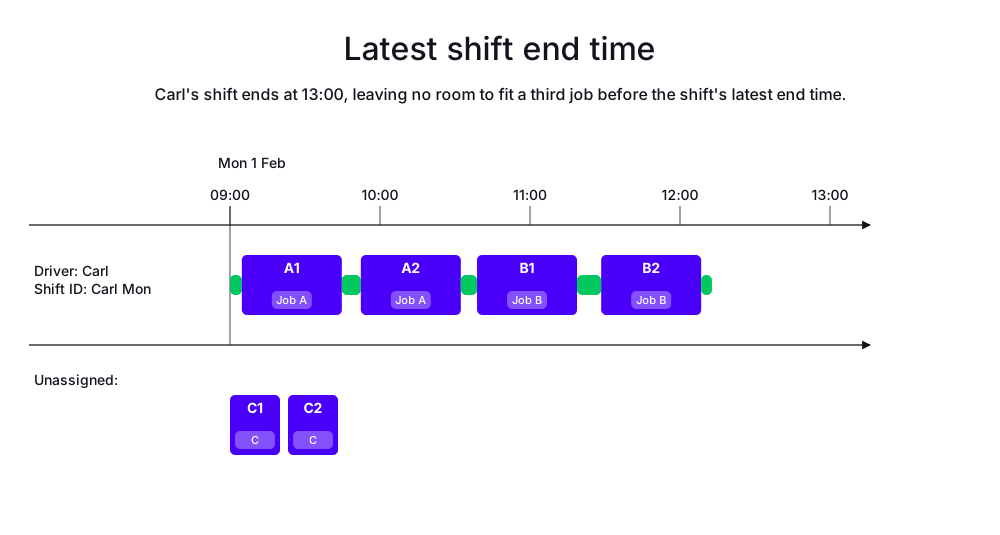
In the following example, Carl works from 09:00 to 13:00 on Mondays. There are 3 jobs, but Carl can only complete two of them before his shift ends at 13:00.
Job A is assigned to Carl, and Job B is assigned to Carl, but Job C cannot be assigned to Carl because it would cause him to finish his shift after 13:00.
-
Input
-
Output
Try this example in Timefold Platform by saving this JSON into a file called sample.json and make the following API call:
|
curl -X POST -H "Content-type: application/json" -H 'X-API-KEY: <API_KEY>' https://app.timefold.ai/api/models/pickup-delivery-routing/v1/route-plans -d@sample.json{
"config": {
"run": {
"name": "Latest shift end time example"
}
},
"modelInput": {
"drivers": [
{
"id": "Carl",
"shifts": [
{
"id": "Carl Mon",
"startLocation": [33.77284, -84.42989],
"minStartTime": "2027-02-01T09:00:00Z",
"maxEndTime": "2027-02-01T13:00:00Z"
}
]
}
],
"jobs": [
{
"id": "Job A",
"stops": [
{
"id": "A1",
"location": [33.77800, -84.43700],
"duration": "PT40M"
},
{
"id": "A2",
"location": [33.76600, -84.42000],
"duration": "PT40M"
}
]
},
{
"id": "Job B",
"stops": [
{
"id": "B1",
"location": [33.78500, -84.41500],
"duration": "PT40M"
},
{
"id": "B2",
"location": [33.75800, -84.44500],
"duration": "PT40M"
}
]
},
{
"id": "Job C",
"priority": "opt-5",
"stops": [
{
"id": "C1",
"location": [33.79200, -84.40000],
"duration": "PT40M"
},
{
"id": "C2",
"location": [33.74800, -84.46000],
"duration": "PT40M"
}
]
}
]
}
}
To request the solution, locate the ID from the response to the post operation and append it to the following API call:
|
curl -X GET -H 'X-API-KEY: <API_KEY>' https://app.timefold.ai/api/models/pickup-delivery-routing/v1/route-plans/<ID>{
"metadata": {
"id": "ID",
"originId": "ID",
"name": "Latest shift end time example",
"submitDateTime": "2026-07-02T04:44:18.663230596Z",
"startDateTime": "2026-07-02T04:44:25.60678246Z",
"activeDateTime": "2026-07-02T04:44:25.698747893Z",
"completeDateTime": "2026-07-02T04:44:56.100907356Z",
"shutdownDateTime": "2026-07-02T04:44:56.100911043Z",
"solverStatus": "SOLVING_COMPLETED",
"score": "0hard/0medium/-201967soft",
"tags": [
"system.type:from-request",
"system.profile:Standard profile"
],
"validationResult": {
"summary": "OK"
}
},
"modelOutput": {
"drivers": [
{
"id": "Carl",
"shifts": [
{
"id": "Carl Mon",
"startTime": "2027-02-01T09:00:00Z",
"itinerary": [
{
"id": "A1",
"arrivalTime": "2027-02-01T09:04:44Z",
"startServiceTime": "2027-02-01T09:04:44Z",
"departureTime": "2027-02-01T09:44:44Z",
"effectiveDuration": "PT40M",
"travelTimeFromPreviousStandstill": "PT4M44S",
"travelDistanceMetersFromPreviousStandstill": 1279,
"minStartTravelTime": "2027-02-01T00:00:00Z",
"load": [],
"kind": "STOP"
},
{
"id": "A2",
"arrivalTime": "2027-02-01T09:52:20Z",
"startServiceTime": "2027-02-01T09:52:20Z",
"departureTime": "2027-02-01T10:32:20Z",
"effectiveDuration": "PT40M",
"travelTimeFromPreviousStandstill": "PT7M36S",
"travelDistanceMetersFromPreviousStandstill": 3566,
"minStartTravelTime": "2027-02-01T00:00:00Z",
"load": [],
"kind": "STOP"
},
{
"id": "B1",
"arrivalTime": "2027-02-01T10:38:49Z",
"startServiceTime": "2027-02-01T10:38:49Z",
"departureTime": "2027-02-01T11:18:49Z",
"effectiveDuration": "PT40M",
"travelTimeFromPreviousStandstill": "PT6M29S",
"travelDistanceMetersFromPreviousStandstill": 4036,
"minStartTravelTime": "2027-02-01T00:00:00Z",
"load": [],
"kind": "STOP"
},
{
"id": "B2",
"arrivalTime": "2027-02-01T11:28:28Z",
"startServiceTime": "2027-02-01T11:28:28Z",
"departureTime": "2027-02-01T12:08:28Z",
"effectiveDuration": "PT40M",
"travelTimeFromPreviousStandstill": "PT9M39S",
"travelDistanceMetersFromPreviousStandstill": 7039,
"minStartTravelTime": "2027-02-01T00:00:00Z",
"load": [],
"kind": "STOP"
}
],
"metrics": {
"totalTravelTime": "PT32M47S",
"travelTimeFromStartLocationToFirstStop": "PT4M44S",
"travelTimeBetweenStops": "PT23M44S",
"travelTimeFromLastStopToEndLocation": "PT4M19S",
"totalTravelDistanceMeters": 18878,
"travelDistanceFromStartLocationToFirstStopMeters": 1279,
"travelDistanceBetweenStopsMeters": 14641,
"travelDistanceFromLastStopToEndLocationMeters": 2958,
"endLocationArrivalTime": "2027-02-01T12:12:47Z",
"overtime": "PT0S"
}
}
]
}
],
"unassignedJobs": [
{
"id": "Job C",
"unassignedStops": [
"C1",
"C2"
]
}
]
},
"inputMetrics": {
"jobs": 3,
"mandatoryJobs": 2,
"optionalJobs": 1,
"stops": 6,
"drivers": 1,
"driverShifts": 1,
"pinnedStops": 0
},
"kpis": {
"totalTravelTime": "PT32M47S",
"totalTravelDistanceMeters": 18878,
"totalActivatedDrivers": 1,
"totalUnassignedJobs": 1,
"totalAssignedJobs": 2,
"assignedMandatoryJobs": 2,
"assignedOptionalJobs": 0,
"totalUnassignedStops": 2,
"totalAssignedStops": 4,
"assignedMandatoryStops": 4,
"assignedOptionalStops": 0,
"totalOvertime": "PT0S",
"travelTimeFromStartLocationToFirstStop": "PT4M44S",
"travelTimeBetweenStops": "PT23M44S",
"travelTimeFromLastStopToEndLocation": "PT4M19S",
"travelDistanceFromStartLocationToFirstStopMeters": 1279,
"travelDistanceBetweenStopsMeters": 14641,
"travelDistanceFromLastStopToEndLocationMeters": 2958
},
"run": {
"id": "ID",
"originId": "ID",
"name": "Latest shift end time example",
"submitDateTime": "2026-07-02T04:44:18.663230596Z",
"startDateTime": "2026-07-02T04:44:25.60678246Z",
"activeDateTime": "2026-07-02T04:44:25.698747893Z",
"completeDateTime": "2026-07-02T04:44:56.100907356Z",
"shutdownDateTime": "2026-07-02T04:44:56.100911043Z",
"solverStatus": "SOLVING_COMPLETED",
"score": "0hard/0medium/-201967soft",
"tags": [
"system.type:from-request",
"system.profile:Standard profile"
],
"validationResult": {
"summary": "OK"
}
}
}2. Overtime
In the previous example, Carl could not complete all of his assigned jobs because he would finish his shift after his maxEndTime of 13:00.
Some weeks Carl is able to work overtime on Mondays, which makes it possible for him to complete more jobs.
maxSoftEndTime specifies the preferred end time for shifts, and maxEndTime is the latest time a shift can end.
{
  "id": "Carl",
  "shifts": [
    {
      "id": "Carl Mon",
      "startLocation": [33.77284, -84.42989],
      "minStartTime": "2027-02-01T09:00:00Z",
      "maxSoftEndTime": "2027-02-01T13:00:00Z",
      "maxEndTime": "2027-02-01T17:00:00Z"
    }
  ]
}
In this example, the shift can end at 13:00, but Carl can work overtime until 17:00 if necessary, for instance, if no other drivers are available to complete the jobs.
2.1. Preferred shift end time
The Preferred shift end time soft constraint is invoked when a driver shift’s end-of-route arrival time exceeds the shift’s maximum soft end time.
The constraint adds a soft penalty to the dataset score that is equivalent to the number of seconds between the maxSoftEndTime and the time the driver arrives at the end location for their shift, incentivizing Timefold to minimize overtime by completing shifts within preferred time windows.
Stops can still be scheduled even if doing so breaks this constraint, but Timefold is incentivized to use the route plan with the best score.
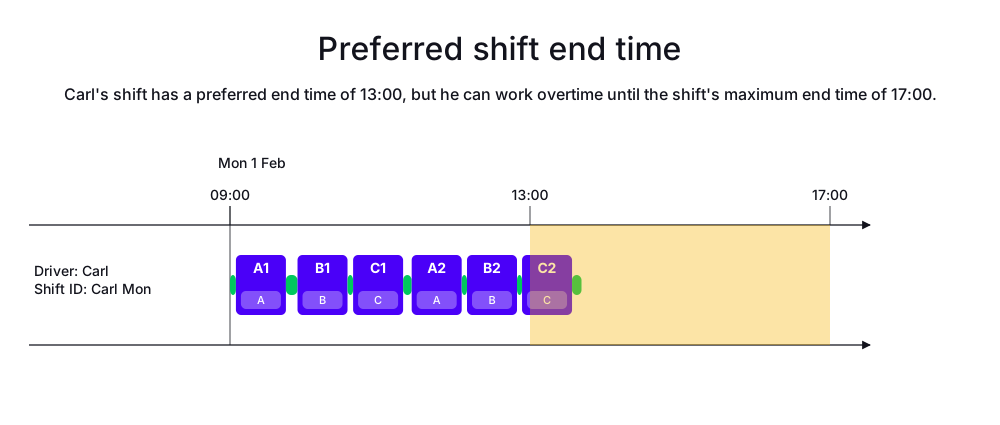
In the following example, Carl works from 09:00 to 13:00 on Mondays, but can work overtime until 17:00 if necessary. The example uses the same jobs as the previous example, but Carl can now complete all 3 jobs because he can work overtime until 17:00.
-
Input
-
Output
Try this example in Timefold Platform by saving this JSON into a file called sample.json and make the following API call:
|
curl -X POST -H "Content-type: application/json" -H 'X-API-KEY: <API_KEY>' https://app.timefold.ai/api/models/pickup-delivery-routing/v1/route-plans -d@sample.json{
"config": {
"run": {
"name": "Preferred shift end time example"
}
},
"modelInput": {
"drivers": [
{
"id": "Carl",
"shifts": [
{
"id": "Carl Mon",
"startLocation": [33.77284, -84.42989],
"minStartTime": "2027-02-01T09:00:00Z",
"maxSoftEndTime": "2027-02-01T13:00:00Z",
"maxEndTime": "2027-02-01T17:00:00Z"
}
]
}
],
"jobs": [
{
"id": "Job A",
"stops": [
{
"id": "A1",
"location": [33.77800, -84.43700],
"duration": "PT40M"
},
{
"id": "A2",
"location": [33.76600, -84.42000],
"duration": "PT40M"
}
]
},
{
"id": "Job B",
"stops": [
{
"id": "B1",
"location": [33.78500, -84.41500],
"duration": "PT40M"
},
{
"id": "B2",
"location": [33.75800, -84.44500],
"duration": "PT40M"
}
]
},
{
"id": "Job C",
"stops": [
{
"id": "C1",
"location": [33.79200, -84.40000],
"duration": "PT40M"
},
{
"id": "C2",
"location": [33.74800, -84.46000],
"duration": "PT40M"
}
]
}
]
}
}
To request the solution, locate the ID from the response to the post operation and append it to the following API call:
|
curl -X GET -H 'X-API-KEY: <API_KEY>' https://app.timefold.ai/api/models/pickup-delivery-routing/v1/route-plans/<ID>{
"metadata": {
"id": "ID",
"originId": "ID",
"name": "Preferred shift end time example",
"submitDateTime": "2026-07-02T05:09:38.574349801Z",
"startDateTime": "2026-07-02T05:10:26.547771796Z",
"activeDateTime": "2026-07-02T05:10:26.649135859Z",
"completeDateTime": "2026-07-02T05:10:57.387051825Z",
"shutdownDateTime": "2026-07-02T05:10:57.387055291Z",
"solverStatus": "SOLVING_COMPLETED",
"score": "0hard/0medium/-4944soft",
"tags": [
"system.type:from-request",
"system.profile:Standard profile"
],
"validationResult": {
"summary": "OK"
}
},
"modelOutput": {
"drivers": [
{
"id": "Carl",
"shifts": [
{
"id": "Carl Mon",
"startTime": "2027-02-01T09:00:00Z",
"itinerary": [
{
"id": "A1",
"arrivalTime": "2027-02-01T09:04:44Z",
"startServiceTime": "2027-02-01T09:04:44Z",
"departureTime": "2027-02-01T09:44:44Z",
"effectiveDuration": "PT40M",
"travelTimeFromPreviousStandstill": "PT4M44S",
"travelDistanceMetersFromPreviousStandstill": 1279,
"minStartTravelTime": "2027-02-01T00:00:00Z",
"load": [],
"kind": "STOP"
},
{
"id": "B1",
"arrivalTime": "2027-02-01T09:54:01Z",
"startServiceTime": "2027-02-01T09:54:01Z",
"departureTime": "2027-02-01T10:34:01Z",
"effectiveDuration": "PT40M",
"travelTimeFromPreviousStandstill": "PT9M17S",
"travelDistanceMetersFromPreviousStandstill": 3701,
"minStartTravelTime": "2027-02-01T00:00:00Z",
"load": [],
"kind": "STOP"
},
{
"id": "C1",
"arrivalTime": "2027-02-01T10:38:29Z",
"startServiceTime": "2027-02-01T10:38:29Z",
"departureTime": "2027-02-01T11:18:29Z",
"effectiveDuration": "PT40M",
"travelTimeFromPreviousStandstill": "PT4M28S",
"travelDistanceMetersFromPreviousStandstill": 2217,
"minStartTravelTime": "2027-02-01T00:00:00Z",
"load": [],
"kind": "STOP"
},
{
"id": "A2",
"arrivalTime": "2027-02-01T11:25:21Z",
"startServiceTime": "2027-02-01T11:25:21Z",
"departureTime": "2027-02-01T12:05:21Z",
"effectiveDuration": "PT40M",
"travelTimeFromPreviousStandstill": "PT6M52S",
"travelDistanceMetersFromPreviousStandstill": 4872,
"minStartTravelTime": "2027-02-01T00:00:00Z",
"load": [],
"kind": "STOP"
},
{
"id": "B2",
"arrivalTime": "2027-02-01T12:09:36Z",
"startServiceTime": "2027-02-01T12:09:36Z",
"departureTime": "2027-02-01T12:49:36Z",
"effectiveDuration": "PT40M",
"travelTimeFromPreviousStandstill": "PT4M15S",
"travelDistanceMetersFromPreviousStandstill": 3045,
"minStartTravelTime": "2027-02-01T00:00:00Z",
"load": [],
"kind": "STOP"
},
{
"id": "C2",
"arrivalTime": "2027-02-01T12:53:38Z",
"startServiceTime": "2027-02-01T12:53:38Z",
"departureTime": "2027-02-01T13:33:38Z",
"effectiveDuration": "PT40M",
"travelTimeFromPreviousStandstill": "PT4M2S",
"travelDistanceMetersFromPreviousStandstill": 2554,
"minStartTravelTime": "2027-02-01T00:00:00Z",
"load": [],
"kind": "STOP"
}
],
"metrics": {
"totalTravelTime": "PT41M12S",
"travelTimeFromStartLocationToFirstStop": "PT4M44S",
"travelTimeBetweenStops": "PT28M54S",
"travelTimeFromLastStopToEndLocation": "PT7M34S",
"totalTravelDistanceMeters": 22956,
"travelDistanceFromStartLocationToFirstStopMeters": 1279,
"travelDistanceBetweenStopsMeters": 16389,
"travelDistanceFromLastStopToEndLocationMeters": 5288,
"endLocationArrivalTime": "2027-02-01T13:41:12Z",
"overtime": "PT41M12S"
}
}
]
}
],
"unassignedJobs": []
},
"inputMetrics": {
"jobs": 3,
"mandatoryJobs": 3,
"optionalJobs": 0,
"stops": 6,
"drivers": 1,
"driverShifts": 1,
"pinnedStops": 0
},
"kpis": {
"totalTravelTime": "PT41M12S",
"totalTravelDistanceMeters": 22956,
"totalActivatedDrivers": 1,
"totalUnassignedJobs": 0,
"totalAssignedJobs": 3,
"assignedMandatoryJobs": 3,
"totalUnassignedStops": 0,
"totalAssignedStops": 6,
"assignedMandatoryStops": 6,
"totalOvertime": "PT41M12S",
"travelTimeFromStartLocationToFirstStop": "PT4M44S",
"travelTimeBetweenStops": "PT28M54S",
"travelTimeFromLastStopToEndLocation": "PT7M34S",
"travelDistanceFromStartLocationToFirstStopMeters": 1279,
"travelDistanceBetweenStopsMeters": 16389,
"travelDistanceFromLastStopToEndLocationMeters": 5288
},
"run": {
"id": "ID",
"originId": "ID",
"name": "Preferred shift end time example",
"submitDateTime": "2026-07-02T05:09:38.574349801Z",
"startDateTime": "2026-07-02T05:10:26.547771796Z",
"activeDateTime": "2026-07-02T05:10:26.649135859Z",
"completeDateTime": "2026-07-02T05:10:57.387051825Z",
"shutdownDateTime": "2026-07-02T05:10:57.387055291Z",
"solverStatus": "SOLVING_COMPLETED",
"score": "0hard/0medium/-4944soft",
"tags": [
"system.type:from-request",
"system.profile:Standard profile"
],
"validationResult": {
"summary": "OK"
}
}
}3. The first travel doesn’t count
In some cases, the employer doesn’t have to pay for the travel to the first stop. Instead, it comes out of the employee’s personal time, regardless if the employee lives near the first stop or on the other side of the region.
In this case, Carl needs to leave home in time to arrive at the first stop. If the stop is one hour away, they will need to leave home at 08:00 to arrive at 09:00.
minFirstStopArrivalTime sets the time Carl needs to arrive at his first stop.
However, the amount of time Carl has to travel before his first stop starts can be limited with minStartTime. For instance, by setting minStartTime to the earliest time Carl could be expected to leave for the first stop.
3.1. The first travel doesn’t count example
In the following example, minFirstStopArrivalTime is 09:00 and minStartTime is 07:00.

To disregard the travel time to the first stop, use minFirstStopArrivalTime instead of minStartTime.
If Carl needs to arrive at his first stop at 09:00, set minFirstStopArrivalTime to 09:00:
{
  "shifts": [
    {
      "id": "Carl Mon",
      "startLocation": [33.68786, -84.18487],
      "minStartTime": "2027-02-01T07:00:00Z",
      "minFirstStopArrivalTime": "2027-02-01T09:00:00Z",
      "maxEndTime": "2027-02-01T17:00:00Z"
    }
  ]
}
To limit the amount of travel time Carl could be asked to complete to arrive at his first stop, use minStartTime and minFirstStopArrivalTime.
| Timefold is incentivized to schedule as many stops as possible. If no limits are placed on travel before the shift starts, drivers could be assigned to start their shifts at stops a long distance away from their start location, requiring them to travel for a long time before their shifts even start. |
If there’s a stop on an island with a long travel time by ferry,
Timefold assigns that travel during Carl’s personal time.
To arrive at the island stop at 09:00, Carl must depart at 06:00.
Adding a minStartTime of 06:00 limits the time Carl must leave for the first stop.
{
  "shifts": [
    {
      "id": "Carl Mon",
      "startLocation": [33.68786, -84.18487],
      "minStartTime": "2027-02-01T06:00:00Z",
      "minFirstStopArrivalTime": "2027-02-01T09:00:00Z",
      "maxEndTime": "2027-02-01T17:00:00Z"
    }
  ]
}
Now, Carl’s travel time will not start before 06:00. Carl departs at 06:00 to arrive at the ferry by 09:00.
4. The last travel doesn’t count
Similarly, the employer doesn’t always have to pay for travel back home from the last stop.
For example, Carl must finish his last stop at 12:10, regardless of how much time it takes him to get home.
maxLastStopDepartureTime sets the latest time Carl can depart from his last stop.
The amount of time Carl has to travel after his last stop can be limited with maxEndTime. For instance, by setting maxEndTime to the latest time Carl could be expected to arrive home.
{
  "shifts": [
    {
      "id": "Carl Mon",
      "startLocation": [33.68786, -84.18487],
      "minStartTime": "2027-02-01T09:00:00Z",
      "maxLastStopDepartureTime": "2027-02-01T17:00:00Z"
    }
  ]
}
The Latest final stop departure time hard constraint penalizes solutions with a hard score if they assign drivers who finish their last stop after the maxLastStopDepartureTime.
Stops will not be assigned if assigning them would cause a driver to finish their last stop after the maxLastStopDepartureTime.
To limit the amount of travel time Carl could be asked to complete after his last stop, use maxEndTime and maxLastStopDepartureTime.
{
  "shifts": [
    {
      "id": "Carl Mon",
      "startLocation": [33.68786, -84.18487],
      "minStartTime": "2027-02-01T09:00:00Z",
      "maxLastStopDepartureTime": "2027-02-01T17:00:00Z",
      "maxEndTime": "2027-02-01T19:00:00Z"
    }
  ]
}
The Preferred final stop departure time soft constraint is invoked when a driver shift’s last stop departure time exceeds the shift’s maximum soft last stop departure time.
The constraint adds a soft penalty to the dataset score that is equivalent to the number of seconds between the maxSoftLastStopDepartureTime and the time the driver departs from their last stop.
Stops will still be scheduled even if doing so breaks this constraint, but Timefold is incentivized to use the route plan with the best score.
4.1. Latest final stop departure time example
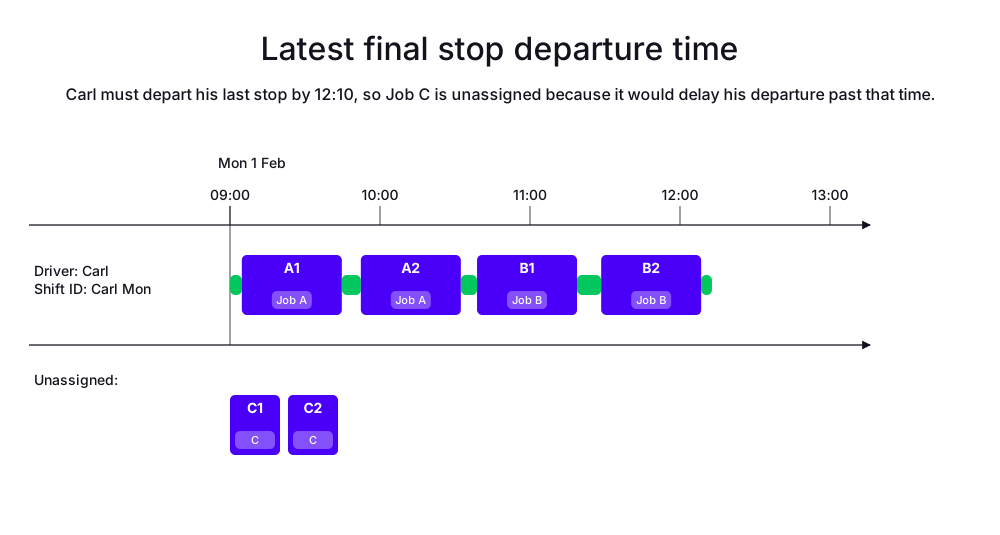
In the following example, Carl must leave his last stop no later than 12:10, regardless of how much time it takes him to get home.
-
Input
-
Output
Try this example in Timefold Platform by saving this JSON into a file called sample.json and make the following API call:
|
curl -X POST -H "Content-type: application/json" -H 'X-API-KEY: <API_KEY>' https://app.timefold.ai/api/models/pickup-delivery-routing/v1/route-plans -d@sample.json{
"config": {
"run": {
"name": "Latest final stop departure time example"
}
},
"modelInput": {
"drivers": [
{
"id": "Carl",
"shifts": [
{
"id": "Carl Mon",
"startLocation": [33.77284, -84.42989],
"minStartTime": "2027-02-01T09:00:00Z",
"maxLastStopDepartureTime": "2027-02-01T12:10:00Z"
}
]
}
],
"jobs": [
{
"id": "Job A",
"stops": [
{
"id": "A1",
"location": [33.77800, -84.43700],
"duration": "PT40M"
},
{
"id": "A2",
"location": [33.76600, -84.42000],
"duration": "PT40M"
}
]
},
{
"id": "Job B",
"stops": [
{
"id": "B1",
"location": [33.78500, -84.41500],
"duration": "PT40M"
},
{
"id": "B2",
"location": [33.75800, -84.44500],
"duration": "PT40M"
}
]
},
{
"id": "Job C",
"priority": "opt-5",
"stops": [
{
"id": "C1",
"location": [33.79200, -84.40000],
"duration": "PT40M"
},
{
"id": "C2",
"location": [33.74800, -84.46000],
"duration": "PT40M"
}
]
}
]
}
}
To request the solution, locate the ID from the response to the post operation and append it to the following API call:
|
curl -X GET -H 'X-API-KEY: <API_KEY>' https://app.timefold.ai/api/models/pickup-delivery-routing/v1/route-plans/<ID>{
"metadata": {
"id": "ID",
"originId": "ID",
"name": "Latest final stop departure time example",
"submitDateTime": "2026-07-02T05:59:43.093313998Z",
"startDateTime": "2026-07-02T05:59:49.884225234Z",
"activeDateTime": "2026-07-02T05:59:49.988889028Z",
"completeDateTime": "2026-07-02T06:00:20.368362222Z",
"shutdownDateTime": "2026-07-02T06:00:20.368365312Z",
"solverStatus": "SOLVING_COMPLETED",
"score": "0hard/0medium/-201967soft",
"tags": [
"system.type:from-request",
"system.profile:Standard profile"
],
"validationResult": {
"summary": "OK"
}
},
"modelOutput": {
"drivers": [
{
"id": "Carl",
"shifts": [
{
"id": "Carl Mon",
"startTime": "2027-02-01T09:00:00Z",
"itinerary": [
{
"id": "A1",
"arrivalTime": "2027-02-01T09:04:44Z",
"startServiceTime": "2027-02-01T09:04:44Z",
"departureTime": "2027-02-01T09:44:44Z",
"effectiveDuration": "PT40M",
"travelTimeFromPreviousStandstill": "PT4M44S",
"travelDistanceMetersFromPreviousStandstill": 1279,
"minStartTravelTime": "2027-02-01T00:00:00Z",
"load": [],
"kind": "STOP"
},
{
"id": "A2",
"arrivalTime": "2027-02-01T09:52:20Z",
"startServiceTime": "2027-02-01T09:52:20Z",
"departureTime": "2027-02-01T10:32:20Z",
"effectiveDuration": "PT40M",
"travelTimeFromPreviousStandstill": "PT7M36S",
"travelDistanceMetersFromPreviousStandstill": 3566,
"minStartTravelTime": "2027-02-01T00:00:00Z",
"load": [],
"kind": "STOP"
},
{
"id": "B1",
"arrivalTime": "2027-02-01T10:38:49Z",
"startServiceTime": "2027-02-01T10:38:49Z",
"departureTime": "2027-02-01T11:18:49Z",
"effectiveDuration": "PT40M",
"travelTimeFromPreviousStandstill": "PT6M29S",
"travelDistanceMetersFromPreviousStandstill": 4036,
"minStartTravelTime": "2027-02-01T00:00:00Z",
"load": [],
"kind": "STOP"
},
{
"id": "B2",
"arrivalTime": "2027-02-01T11:28:28Z",
"startServiceTime": "2027-02-01T11:28:28Z",
"departureTime": "2027-02-01T12:08:28Z",
"effectiveDuration": "PT40M",
"travelTimeFromPreviousStandstill": "PT9M39S",
"travelDistanceMetersFromPreviousStandstill": 7039,
"minStartTravelTime": "2027-02-01T00:00:00Z",
"load": [],
"kind": "STOP"
}
],
"metrics": {
"totalTravelTime": "PT32M47S",
"travelTimeFromStartLocationToFirstStop": "PT4M44S",
"travelTimeBetweenStops": "PT23M44S",
"travelTimeFromLastStopToEndLocation": "PT4M19S",
"totalTravelDistanceMeters": 18878,
"travelDistanceFromStartLocationToFirstStopMeters": 1279,
"travelDistanceBetweenStopsMeters": 14641,
"travelDistanceFromLastStopToEndLocationMeters": 2958,
"endLocationArrivalTime": "2027-02-01T12:12:47Z",
"overtime": "PT0S"
}
}
]
}
],
"unassignedJobs": [
{
"id": "Job C",
"unassignedStops": [
"C1",
"C2"
]
}
]
},
"inputMetrics": {
"jobs": 3,
"mandatoryJobs": 2,
"optionalJobs": 1,
"stops": 6,
"drivers": 1,
"driverShifts": 1,
"pinnedStops": 0
},
"kpis": {
"totalTravelTime": "PT32M47S",
"totalTravelDistanceMeters": 18878,
"totalActivatedDrivers": 1,
"totalUnassignedJobs": 1,
"totalAssignedJobs": 2,
"assignedMandatoryJobs": 2,
"assignedOptionalJobs": 0,
"totalUnassignedStops": 2,
"totalAssignedStops": 4,
"assignedMandatoryStops": 4,
"assignedOptionalStops": 0,
"totalOvertime": "PT0S",
"travelTimeFromStartLocationToFirstStop": "PT4M44S",
"travelTimeBetweenStops": "PT23M44S",
"travelTimeFromLastStopToEndLocation": "PT4M19S",
"travelDistanceFromStartLocationToFirstStopMeters": 1279,
"travelDistanceBetweenStopsMeters": 14641,
"travelDistanceFromLastStopToEndLocationMeters": 2958
},
"run": {
"id": "ID",
"originId": "ID",
"name": "Latest final stop departure time example",
"submitDateTime": "2026-07-02T05:59:43.093313998Z",
"startDateTime": "2026-07-02T05:59:49.884225234Z",
"activeDateTime": "2026-07-02T05:59:49.988889028Z",
"completeDateTime": "2026-07-02T06:00:20.368362222Z",
"shutdownDateTime": "2026-07-02T06:00:20.368365312Z",
"solverStatus": "SOLVING_COMPLETED",
"score": "0hard/0medium/-201967soft",
"tags": [
"system.type:from-request",
"system.profile:Standard profile"
],
"validationResult": {
"summary": "OK"
}
}
}4.2. Preferred final stop departure time example
To limit how late Carl can leave his last stop, use maxSoftLastStopDepartureTime and maxLastStopDepartureTime.
maxSoftLastStopDepartureTime specifies the preferred time for Carl to leave his last stop, and maxLastStopDepartureTime is the latest time Carl can leave his last stop.
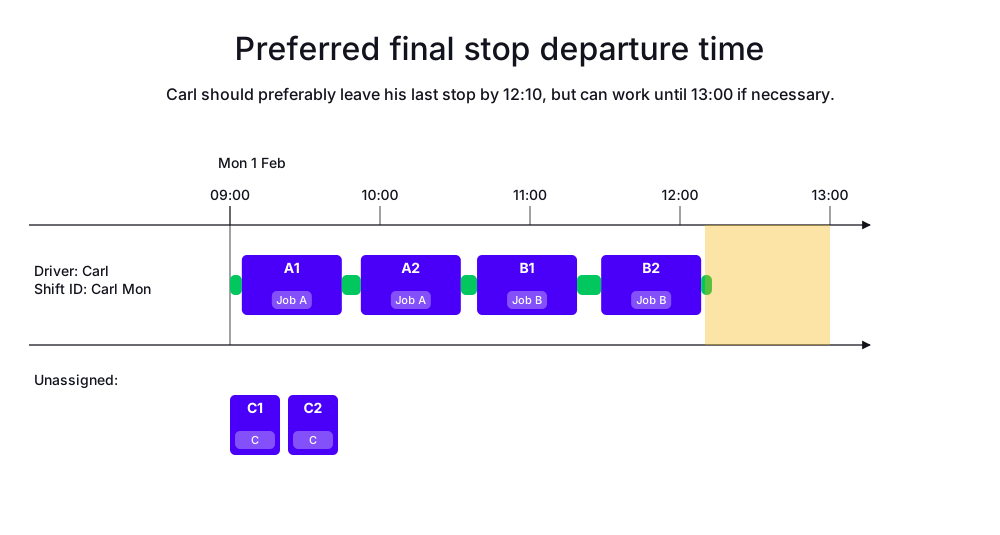
In the following example, Carl should preferably leave his last stop by 12:10, but he can work until 13:00 if necessary.
-
Input
-
Output
Try this example in Timefold Platform by saving this JSON into a file called sample.json and make the following API call:
|
curl -X POST -H "Content-type: application/json" -H 'X-API-KEY: <API_KEY>' https://app.timefold.ai/api/models/pickup-delivery-routing/v1/route-plans -d@sample.json{
"config": {
"run": {
"name": "Preferred final stop departure time example"
}
},
"modelInput": {
"drivers": [
{
"id": "Carl",
"shifts": [
{
"id": "Carl Mon",
"startLocation": [33.77284, -84.42989],
"minStartTime": "2027-02-01T09:00:00Z",
"maxSoftLastStopDepartureTime": "2027-02-01T12:10:00Z",
"maxLastStopDepartureTime": "2027-02-01T13:00:00Z"
}
]
}
],
"jobs": [
{
"id": "Job A",
"stops": [
{
"id": "A1",
"location": [33.77800, -84.43700],
"duration": "PT40M"
},
{
"id": "A2",
"location": [33.76600, -84.42000],
"duration": "PT40M"
}
]
},
{
"id": "Job B",
"stops": [
{
"id": "B1",
"location": [33.78500, -84.41500],
"duration": "PT40M"
},
{
"id": "B2",
"location": [33.75800, -84.44500],
"duration": "PT40M"
}
]
},
{
"id": "Job C",
"priority": "opt-5",
"stops": [
{
"id": "C1",
"location": [33.79200, -84.40000],
"duration": "PT40M"
},
{
"id": "C2",
"location": [33.74800, -84.46000],
"duration": "PT40M"
}
]
}
]
}
}
To request the solution, locate the ID from the response to the post operation and append it to the following API call:
|
curl -X GET -H 'X-API-KEY: <API_KEY>' https://app.timefold.ai/api/models/pickup-delivery-routing/v1/route-plans/<ID>{
"metadata": {
"id": "ID",
"originId": "ID",
"name": "Preferred final stop departure time example",
"submitDateTime": "2026-07-02T06:57:23.317092798Z",
"startDateTime": "2026-07-02T06:57:30.032521267Z",
"activeDateTime": "2026-07-02T06:57:30.128939033Z",
"completeDateTime": "2026-07-02T06:58:00.526786003Z",
"shutdownDateTime": "2026-07-02T06:58:00.526788975Z",
"solverStatus": "SOLVING_COMPLETED",
"score": "0hard/0medium/-201967soft",
"tags": [
"system.type:from-request",
"system.profile:Standard profile"
],
"validationResult": {
"summary": "OK"
}
},
"modelOutput": {
"drivers": [
{
"id": "Carl",
"shifts": [
{
"id": "Carl Mon",
"startTime": "2027-02-01T09:00:00Z",
"itinerary": [
{
"id": "A1",
"arrivalTime": "2027-02-01T09:04:44Z",
"startServiceTime": "2027-02-01T09:04:44Z",
"departureTime": "2027-02-01T09:44:44Z",
"effectiveDuration": "PT40M",
"travelTimeFromPreviousStandstill": "PT4M44S",
"travelDistanceMetersFromPreviousStandstill": 1279,
"minStartTravelTime": "2027-02-01T00:00:00Z",
"load": [],
"kind": "STOP"
},
{
"id": "A2",
"arrivalTime": "2027-02-01T09:52:20Z",
"startServiceTime": "2027-02-01T09:52:20Z",
"departureTime": "2027-02-01T10:32:20Z",
"effectiveDuration": "PT40M",
"travelTimeFromPreviousStandstill": "PT7M36S",
"travelDistanceMetersFromPreviousStandstill": 3566,
"minStartTravelTime": "2027-02-01T00:00:00Z",
"load": [],
"kind": "STOP"
},
{
"id": "B1",
"arrivalTime": "2027-02-01T10:38:49Z",
"startServiceTime": "2027-02-01T10:38:49Z",
"departureTime": "2027-02-01T11:18:49Z",
"effectiveDuration": "PT40M",
"travelTimeFromPreviousStandstill": "PT6M29S",
"travelDistanceMetersFromPreviousStandstill": 4036,
"minStartTravelTime": "2027-02-01T00:00:00Z",
"load": [],
"kind": "STOP"
},
{
"id": "B2",
"arrivalTime": "2027-02-01T11:28:28Z",
"startServiceTime": "2027-02-01T11:28:28Z",
"departureTime": "2027-02-01T12:08:28Z",
"effectiveDuration": "PT40M",
"travelTimeFromPreviousStandstill": "PT9M39S",
"travelDistanceMetersFromPreviousStandstill": 7039,
"minStartTravelTime": "2027-02-01T00:00:00Z",
"load": [],
"kind": "STOP"
}
],
"metrics": {
"totalTravelTime": "PT32M47S",
"travelTimeFromStartLocationToFirstStop": "PT4M44S",
"travelTimeBetweenStops": "PT23M44S",
"travelTimeFromLastStopToEndLocation": "PT4M19S",
"totalTravelDistanceMeters": 18878,
"travelDistanceFromStartLocationToFirstStopMeters": 1279,
"travelDistanceBetweenStopsMeters": 14641,
"travelDistanceFromLastStopToEndLocationMeters": 2958,
"endLocationArrivalTime": "2027-02-01T12:12:47Z",
"overtime": "PT0S"
}
}
]
}
],
"unassignedJobs": [
{
"id": "Job C",
"unassignedStops": [
"C1",
"C2"
]
}
]
},
"inputMetrics": {
"jobs": 3,
"mandatoryJobs": 2,
"optionalJobs": 1,
"stops": 6,
"drivers": 1,
"driverShifts": 1,
"pinnedStops": 0
},
"kpis": {
"totalTravelTime": "PT32M47S",
"totalTravelDistanceMeters": 18878,
"totalActivatedDrivers": 1,
"totalUnassignedJobs": 1,
"totalAssignedJobs": 2,
"assignedMandatoryJobs": 2,
"assignedOptionalJobs": 0,
"totalUnassignedStops": 2,
"totalAssignedStops": 4,
"assignedMandatoryStops": 4,
"assignedOptionalStops": 0,
"totalOvertime": "PT0S",
"travelTimeFromStartLocationToFirstStop": "PT4M44S",
"travelTimeBetweenStops": "PT23M44S",
"travelTimeFromLastStopToEndLocation": "PT4M19S",
"travelDistanceFromStartLocationToFirstStopMeters": 1279,
"travelDistanceBetweenStopsMeters": 14641,
"travelDistanceFromLastStopToEndLocationMeters": 2958
},
"run": {
"id": "ID",
"originId": "ID",
"name": "Preferred final stop departure time example",
"submitDateTime": "2026-07-02T06:57:23.317092798Z",
"startDateTime": "2026-07-02T06:57:30.032521267Z",
"activeDateTime": "2026-07-02T06:57:30.128939033Z",
"completeDateTime": "2026-07-02T06:58:00.526786003Z",
"shutdownDateTime": "2026-07-02T06:58:00.526788975Z",
"solverStatus": "SOLVING_COMPLETED",
"score": "0hard/0medium/-201967soft",
"tags": [
"system.type:from-request",
"system.profile:Standard profile"
],
"validationResult": {
"summary": "OK"
}
}
}Next
-
See the full API spec, try the online API, or start a free trial.