Route optimization
By default, Timefold optimizes routes to minimize the amount of time drivers spend driving between stops. This lowers costs, reduces emissions, and makes drivers more productive as they spend less time driving. Reducing travel, including deadhead miles driven empty between a drop-off and the next pick-up, raises the number of stops each driver completes per hour and lowers the cost per stop.
This guide explains route optimization with the following:
1. Minimize travel time
The Minimize travel time soft constraint is invoked when a stop is assigned to a driver route.
The constraint adds a soft penalty to the dataset score for every second of travel time in the route plan, which is calculated based on the travel time between stops and breaks in the driver shift itinerary.
|
Soft constraints compete with each other as the solver optimizes the final solution. That means this constraint may leave jobs unassigned in favor of jobs with different soft constraints. Every soft constraint has a weight that can be configured to change the relative importance of the constraint compared to other constraints. Learn about constraint weights. |
2. Minimize waiting time
By default, the Minimize waiting time soft constraint is disabled.
The Minimize waiting time soft constraint is invoked when a driver has to wait before starting the service at a stop.
A driver waits, for instance, when arriving at a stop before its time window opens.
The constraint adds a soft penalty to the dataset score for every second of waiting time in the route plan. Timefold is incentivized to use the route plan with the best score.
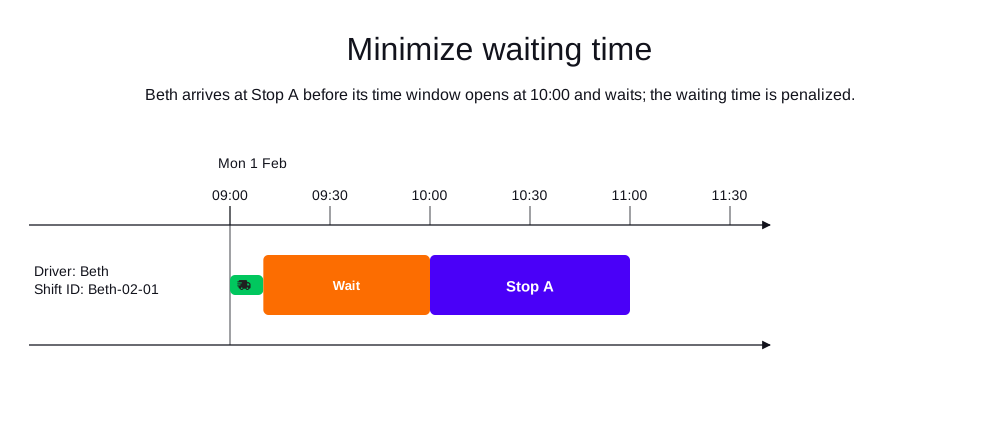
In the following example, Beth arrives at Stop A before its time window opens at 10:00, so she waits before starting the service. The waiting time is penalized.
|
Soft constraints compete with each other as the solver optimizes the final solution. That means this constraint may leave jobs unassigned in favor of jobs with different soft constraints. Every soft constraint has a weight that can be configured to change the relative importance of the constraint compared to other constraints. Learn about constraint weights. |
If you choose to activate both the minimize travel time and minimize waiting time constraints together, it’s important to consider how they will be balanced.
The default penalty units for waiting time and travel time are both expressed in seconds. If you assign equal weights to minimize waiting time and minimize travel time, the solver may treat one second of waiting as equally undesirable as one second of driving.
In practice, these two are rarely equivalent: travel time incurs fuel and maintenance costs, while waiting time (which is also undesirable) may be partially productive and less costly.
When configuring the weight of "minimize waiting time", consider it in relation to your existing "minimize travel time" weight. A higher waiting-time weight pushes the solver toward solutions with more driving and less waiting; a lower weight does the opposite.
3. Required reachable itineraries and stops
Every driver shift itinerary needs to represent a route that is reachable on the map. For instance, a shift starting on the mainland cannot be assigned a job stop located on an island which is not connected by a route to the mainland.
In case a driver shift itinerary contains an unreachable route, it gets penalized with a hard score penalty by one or both of the following constraints:
-
Do not assign unreachable routes: Penalizes a driver shift itinerary that contains an unreachable route caused by an unreachable stop, break, or shift end location. -
Only assign reachable stops: Penalizes a stop which is unreachable from the location of the previous stop in the itinerary or the driver shift start location (in the case of the first stop in the itinerary).
The model output elements DriverShiftPlan, StopPlan and BreakPlan contain the unreachable boolean attribute indicating:
-
DriverShiftPlan.unreachable = true: The driver shift itinerary contains a route between two locations that is unreachable on the map, such a route can be:-
From the driver shift start location to the first stop or break with location.
-
From a break with location to the next break with location or the next stop.
-
From a stop to the next break with location or the next stop.
-
From the last stop or break with location to the driver shift end location.
-
-
StopPlan.unreachable = true: The previous itinerary item is unreachable or the route from the previous stop, location break, or driver shift start to the stop location is not reachable on the map. -
BreakPlan.unreachable = true: The previous itinerary item is unreachable or the route from the previous stop, location break, or driver shift start to the break location is not reachable on the map.
The unreachable attribute is omitted when false to avoid increasing payload size.
Example of model output containing an unreachable route to Stop A and Break B in a driver shift itinerary:
{
  "shifts": [
    {
      "id": "Ann - Monday",
      "itinerary": [
        {
          "id": "Stop A",
          "kind": "STOP",
          "unreachable": true
        },
        {
          "id": "Break B",
          "kind": "BREAK",
          "startTime": "2026-01-12T14:00:00-04:00",
          "endTime": "2026-01-12T15:00:00-04:00",
          "unreachable": true
        }
      ],
      "unreachable": true
    }
  ]
}
Next
-
See the full API spec, try the online API, or start a free trial.