Visit service level agreement (SLA)
Visits can have hard and soft requirements for the time windows when visits can occur. These time windows can represent the business hours of the service location, the customer’s availability, or even the customer’s preferred times.
In addition to these constraints about site availability, there are often requirements (including contractual requirements) regarding the latest time visits can be completed. For instance, if the company promises service within a specific time period of a service being requested.
This requirement is called a service level agreement (SLA).
This is often determined by the urgency of the incident that has been reported, and how quickly the service must be performed. Service level agreements are often tiered by urgency, for example a two-hour, four-hour, or eight-hour response window, and missing them can trigger financial penalties or the loss of a contract renewal. They matter most where scheduled preventive maintenance competes with urgent reactive work for the same technicians.
This guide describes the SLA with the following example:
1. Visit SLAs
Learn how to configure an API Key to run the examples in this guide:
In the examples, replace |
SLAs are defined in visits:
{
  "visits": [
    {
      "id": "Visit A",
      "location": [34.31785, -83.82816],
      "serviceDuration": "PT1H30M",
      "latestSlaEndTime": "2027-02-01T13:00:00Z"
    }
  ]
}
latestSlaEndTime defines the latest time the visit can end to satisfy the SLA.
latestSlaEndTime uses ISO 8601 date and time format with offset to UTC format.
The Latest SLA end time soft constraint is invoked for any visit with a latestSlaEndTime, where the latestSlaEndTime is not met.
To optimize for SLAs, the constraint adds a soft score penalty to the dataset if the visit ends after the time specified by latestSlaEndTime.
The penalty is equivalent to the number of seconds between latestSlaEndTime and when the visit ends.
If a visit with a latestSlaEndTime remains unassigned and the latestSlaEndTime is within the planning window, the soft penalty will also be applied.
In this case, the penalty is derived from the time between latestSlaEndTime and the end of the planning window.
Visits can still be scheduled even if doing so breaks this constraint, but Timefold is incentivized to use the route plan with the best score.
|
Every soft constraint has a weight that can be configured to change the relative importance of the constraint compared to other constraints. Learn about constraint weights. |
1.1. Visit SLAs example
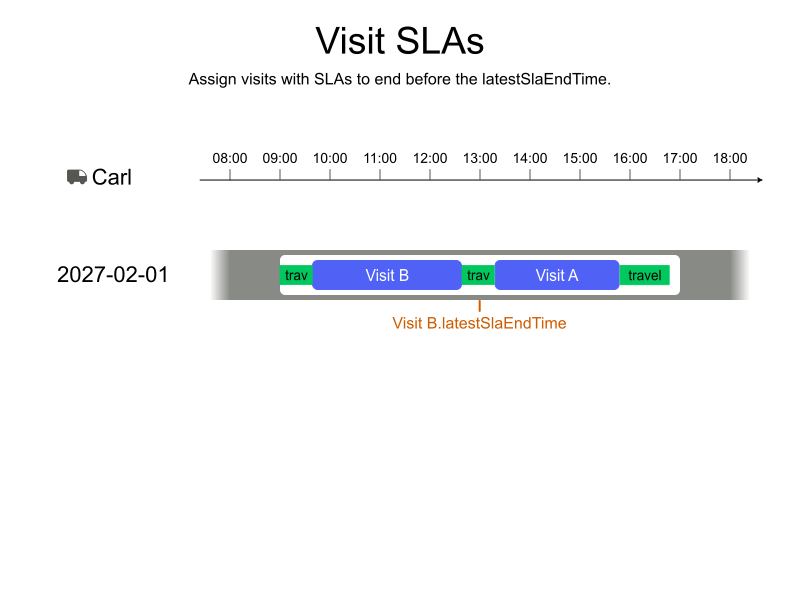
In this example, Carl’s shift begins at 09:00.
There are two visits, Visit A and Visit B, that need to be scheduled.
Visit B has a latestSlaEndTime of 2027-02-01T13:00:00Z, which means that it must be completed by 13:00.
Visit A does not include a latestSlaEndTime.
Visit B is scheduled first so the visit can be completed by the latestSlaEndTime.
-
Input
-
Output
Try this example in Timefold Platform by saving the JSON into a file called sla-example-1.json and make the following API call:
|
curl -X POST -H "Content-type: application/json" -H 'X-API-KEY: <API_KEY>' https://app.timefold.ai/api/models/field-service-routing/v1/route-plans -d@sla-example-1.json{
"config": {
"run": {
"name": "SLA example"
}
},
"modelInput": {
"vehicles": [
{
"id": "Carl",
"shifts": [
{
"id": "Carl-2027-02-01",
"startLocation": [33.68786, -84.18487],
"minStartTime": "2027-02-01T09:00:00Z",
"maxEndTime": "2027-02-01T17:00:00Z"
}
]
}
],
"visits": [
{
"id": "Visit A",
"location": [33.31785, -83.82816],
"serviceDuration": "PT2H30M"
},
{
"id": "Visit B",
"location": [33.32468, -84.127456],
"serviceDuration": "PT3H",
"latestSlaEndTime": "2027-02-01T13:00:00Z"
}
]
}
}
To request the solution, locate the ID from the response to the post operation and append it to the following API call:
|
curl -X GET -H 'X-API-KEY: <API_KEY>' https://app.timefold.ai/api/models/field-service-routing/v1/route-plans/<ID>{
"metadata": {
"id": "ID",
"name": "SLA example",
"submitDateTime": "2025-05-16T12:01:05.974541+02:00",
"startDateTime": "2025-05-16T12:01:05.987945+02:00",
"activeDateTime": "2025-05-16T12:01:05.993695+02:00",
"completeDateTime": "2025-05-16T12:01:36.002054+02:00",
"shutdownDateTime": "2025-05-16T12:01:36.004414+02:00",
"solverStatus": "SOLVING_COMPLETED",
"score": "0hard/0medium/-130078soft",
"tags": null,
"validationResult": {
"summary": "OK"
}
},
"modelOutput": {
"vehicles": [
{
"id": "Carl",
"shifts": [
{
"id": "Carl-2027-02-01",
"startTime": "2027-02-01T09:00:00Z",
"itinerary": [
{
"id": "Visit B",
"kind": "VISIT",
"arrivalTime": "2027-02-01T09:48:53Z",
"startServiceTime": "2027-02-01T09:48:53Z",
"departureTime": "2027-02-01T12:48:53Z",
"effectiveServiceDuration": "PT3H",
"travelTimeFromPreviousStandstill": "PT48M53S",
"travelDistanceMetersFromPreviousStandstill": 40733,
"minStartTravelTime": "2027-02-01T00:00:00Z"
},
{
"id": "Visit A",
"kind": "VISIT",
"arrivalTime": "2027-02-01T13:22:16Z",
"startServiceTime": "2027-02-01T13:22:16Z",
"departureTime": "2027-02-01T15:52:16Z",
"effectiveServiceDuration": "PT2H30M",
"travelTimeFromPreviousStandstill": "PT33M23S",
"travelDistanceMetersFromPreviousStandstill": 27819,
"minStartTravelTime": "2027-02-01T00:00:00Z"
}
],
"metrics": {
"totalTravelTime": "PT2H25M37S",
"travelTimeFromStartLocationToFirstVisit": "PT48M53S",
"travelTimeBetweenVisits": "PT33M23S",
"travelTimeFromLastVisitToEndLocation": "PT1H3M21S",
"totalTravelDistanceMeters": 121341,
"travelDistanceFromStartLocationToFirstVisitMeters": 40733,
"travelDistanceBetweenVisitsMeters": 27819,
"travelDistanceFromLastVisitToEndLocationMeters": 52789,
"endLocationArrivalTime": "2027-02-01T16:55:37Z",
"technicianCosts": null,
"overtime": "PT0S"
}
}
]
}
]
},
"inputMetrics": {
"visits": 2,
"visitGroups": 0,
"vehicles": 1,
"mandatoryVisits": 2,
"optionalVisits": 0,
"vehicleShifts": 1,
"visitsWithSla": 1
},
"kpis": {
"totalTravelTime": "PT2H25M37S",
"travelTimeFromStartLocationToFirstVisit": "PT48M53S",
"travelTimeBetweenVisits": "PT33M23S",
"travelTimeFromLastVisitToEndLocation": "PT1H3M21S",
"totalTravelDistanceMeters": 121341,
"travelDistanceFromStartLocationToFirstVisitMeters": 40733,
"travelDistanceBetweenVisitsMeters": 27819,
"travelDistanceFromLastVisitToEndLocationMeters": 52789,
"totalUnassignedVisits": 0,
"totalAssignedVisits": 2,
"assignedMandatoryVisits": 2,
"assignedOptionalVisits": 0,
"totalActivatedVehicles": 1,
"workingTimeFairnessPercentage": 100.0,
"totalTechnicianCosts": null,
"totalOvertime": "PT0S",
"percentageVisitsInSla": "100.0",
"absoluteVisitsInSla": "1"
}
}2. Prefer scheduling visits with tight SLAs earlier
The Latest SLA end time constraint penalises visits that miss their SLA deadline, but it does not differentiate between visits that both satisfy their SLA.
When two visits are tied on other criteria, the visit with the tighter deadline may still end up scheduled later which increases the risk of disruption if the plan changes or the job takes longer than expected.
The Prefer scheduling visits with tight SLAs earlier soft constraint addresses this by incentivising the model to schedule visits with a closer SLA deadline earlier in the planning period.
It is disabled by default and can be enabled by setting the preferSchedulingEarlierBasedOnSlaWeight in the model configuration.
{
  "config": {
    "model": {
      "overrides": {
        "preferSchedulingEarlierBasedOnSlaWeight": 1
      }
    }
  }
}
The penalty for each visit is proportional to how late in the planning period it is scheduled relative to how much time remains before its SLA deadline:
penalty = secondsFromPlanningPeriodStart / secondsUntilSlaDeadline * weight
A visit scheduled early with plenty of SLA slack receives a low penalty. A visit scheduled late with little SLA slack receives a high penalty, steering the solver to prefer moving it earlier.
|
Every soft constraint has a weight that can be configured to change the relative importance of the constraint compared to other constraints. Learn about constraint weights. |
2.1. Prefer scheduling visits with tight SLAs earlier example
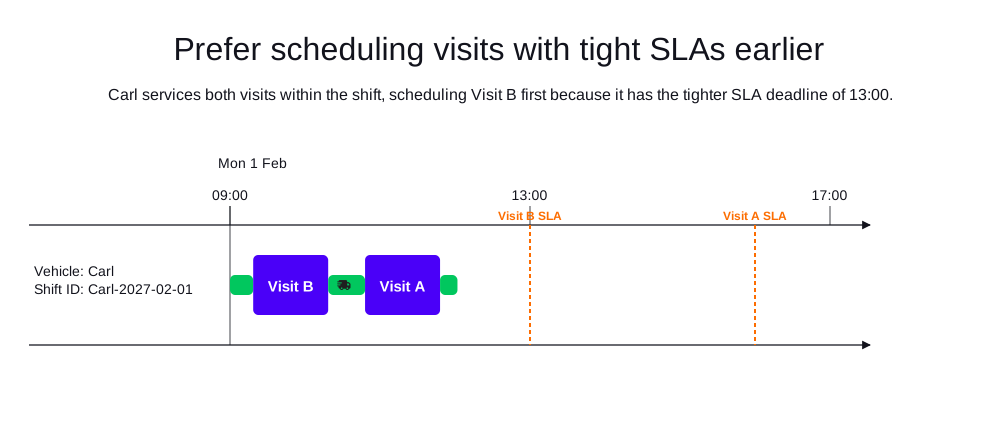
In this example, Carl works a shift from 09:00 to 17:00.
There are two visits, Visit A and Visit B, that both fit in the shift and sit an equal distance from the shift start, so travel time is symmetric.
Visit A has a latestSlaEndTime of 16:00 and Visit B has a tighter latestSlaEndTime of 13:00.
With preferSchedulingEarlierBasedOnSlaWeight enabled, the model sequences Visit B first and Visit A second, and both visits are assigned and meet their SLA.
-
Input
-
Output
Try this example in Timefold Platform by saving the JSON into a file called sla-example-2.json and make the following API call:
|
curl -X POST -H "Content-type: application/json" -H 'X-API-KEY: <API_KEY>' https://app.timefold.ai/api/models/field-service-routing/v1/route-plans -d@sla-example-2.json{
"config": {
"run": {
"name": "Schedule tighter SLA earlier"
},
"model": {
"overrides": {
"preferSchedulingEarlierBasedOnSlaWeight": 1
}
}
},
"modelInput": {
"vehicles": [
{
"id": "Carl",
"shifts": [
{
"id": "Carl-2027-02-01",
"startLocation": [33.68786, -84.18487],
"minStartTime": "2027-02-01T09:00:00Z",
"maxEndTime": "2027-02-01T17:00:00Z"
}
]
}
],
"visits": [
{
"id": "Visit A",
"location": [33.72000, -84.32000],
"serviceDuration": "PT1H",
"latestSlaEndTime": "2027-02-01T16:00:00Z"
},
{
"id": "Visit B",
"location": [33.72000, -84.05000],
"serviceDuration": "PT1H",
"latestSlaEndTime": "2027-02-01T13:00:00Z"
}
],
"planningWindow": {
"startDate": "2027-02-01T00:00:00Z",
"endDate": "2027-02-02T00:00:00Z"
}
}
}
To request the solution, locate the ID from the response to the post operation and append it to the following API call:
|
curl -X GET -H 'X-API-KEY: <API_KEY>' https://app.timefold.ai/api/models/field-service-routing/v1/route-plans/<ID>{
"metadata": {
"id": "ID",
"originId": "ID",
"name": "Schedule tighter SLA earlier",
"submitDateTime": "2026-09-10T03:34:43.126804276Z",
"startDateTime": "2026-09-10T03:35:14.939458525Z",
"activeDateTime": "2026-09-10T03:35:15.043538542Z",
"completeDateTime": "2026-09-10T03:35:45.475019155Z",
"shutdownDateTime": "2026-09-10T03:35:45.475024123Z",
"solverStatus": "SOLVING_COMPLETED",
"score": "0hard/0medium/-699006soft",
"tags": [
"system.type:from-request",
"system.profile:Standard profile"
],
"validationResult": {
"summary": "OK"
}
},
"modelOutput": {
"vehicles": [
{
"id": "Carl",
"shifts": [
{
"id": "Carl-2027-02-01",
"startTime": "2027-02-01T09:00:00Z",
"itinerary": [
{
"id": "Visit B",
"arrivalTime": "2027-02-01T09:18:33Z",
"startServiceTime": "2027-02-01T09:18:33Z",
"departureTime": "2027-02-01T10:18:33Z",
"effectiveServiceDuration": "PT1H",
"travelTimeFromPreviousStandstill": "PT18M33S",
"travelDistanceMetersFromPreviousStandstill": 16337,
"minStartTravelTime": "2027-02-01T00:00:00Z",
"kind": "VISIT"
},
{
"id": "Visit A",
"arrivalTime": "2027-02-01T10:48:03Z",
"startServiceTime": "2027-02-01T10:48:03Z",
"departureTime": "2027-02-01T11:48:03Z",
"effectiveServiceDuration": "PT1H",
"travelTimeFromPreviousStandstill": "PT29M30S",
"travelDistanceMetersFromPreviousStandstill": 32889,
"minStartTravelTime": "2027-02-01T00:00:00Z",
"kind": "VISIT"
}
],
"metrics": {
"totalServiceDuration": "PT2H",
"totalBreakDuration": "PT0S",
"totalWaitingTime": "PT0S",
"totalTravelTime": "PT1H1M58S",
"travelTimeFromStartLocationToFirstVisit": "PT18M33S",
"travelTimeBetweenVisits": "PT29M30S",
"travelTimeFromLastVisitToEndLocation": "PT13M55S",
"totalTravelDistanceMeters": 66314,
"travelDistanceFromStartLocationToFirstVisitMeters": 16337,
"travelDistanceBetweenVisitsMeters": 32889,
"travelDistanceFromLastVisitToEndLocationMeters": 17088,
"endLocationArrivalTime": "2027-02-01T12:01:58Z",
"overtime": "PT0S",
"availableOvertime": "PT0S"
}
}
],
"metrics": {
"activatedShifts": 1,
"assignedVisits": 2,
"totalShiftDuration": "PT3H1M58S",
"totalServiceDuration": "PT2H",
"totalTravelTime": "PT1H1M58S",
"totalTravelDistanceMeters": 66314,
"totalBreakTime": "PT0S",
"totalWaitingTime": "PT0S",
"totalOvertime": "PT0S",
"availableOvertime": "PT0S"
}
}
],
"unassignedVisits": []
},
"inputMetrics": {
"vehicles": 1,
"vehicleShifts": 1,
"visits": 2,
"mandatoryVisits": 2,
"optionalVisits": 0,
"pinnedVisits": 0,
"visitsWithSla": 2,
"visitGroups": 0,
"visitDependencies": 0,
"excludedVisits": 0,
"movableVisits": 0
},
"kpis": {
"averageTravelTimePerVisit": "PT30M59S",
"totalTravelTime": "PT1H1M58S",
"travelTimeFromStartLocationToFirstVisit": "PT18M33S",
"travelTimeBetweenVisits": "PT29M30S",
"travelTimeFromLastVisitToEndLocation": "PT13M55S",
"averageTravelDistanceMetersPerVisit": 33157,
"totalTravelDistanceMeters": 66314,
"travelDistanceFromStartLocationToFirstVisitMeters": 16337,
"travelDistanceBetweenVisitsMeters": 32889,
"travelDistanceFromLastVisitToEndLocationMeters": 17088,
"totalUnassignedVisits": 0,
"totalAssignedVisits": 2,
"assignedMandatoryVisits": 2,
"unassignedMandatoryVisits": 0,
"totalActivatedVehicles": 1,
"workingTimeFairnessPercentage": 100,
"totalOvertime": "PT0S",
"availableOvertime": "PT0S",
"percentageVisitsInSla": 100,
"absoluteVisitsInSla": 2
},
"run": {
"id": "ID",
"originId": "ID",
"name": "Schedule tighter SLA earlier",
"submitDateTime": "2026-09-10T03:34:43.126804276Z",
"startDateTime": "2026-09-10T03:35:14.939458525Z",
"activeDateTime": "2026-09-10T03:35:15.043538542Z",
"completeDateTime": "2026-09-10T03:35:45.475019155Z",
"shutdownDateTime": "2026-09-10T03:35:45.475024123Z",
"solverStatus": "SOLVING_COMPLETED",
"score": "0hard/0medium/-699006soft",
"tags": [
"system.type:from-request",
"system.profile:Standard profile"
],
"validationResult": {
"summary": "OK"
}
}
}3. Penalize unassigned visits based on SLA deadline
When there is not enough capacity to schedule every visit, visit priority normally decides which visits are left unassigned.
As an alternative, Timefold can instead decide based on how tight each visit’s latestSlaEndTime is: among the visits that must be left unassigned, it prefers to leave those with the most slack before their SLA deadline unassigned, over those whose deadline is more urgent.
This is controlled by two constraints, both disabled by default:
-
Require scheduling mandatory visits with tighter SLAis a medium constraint, enabled by settingrequireSchedulingMandatoryVisitsWithTighterSlaWeight, and applies to mandatory visits. -
Prefer scheduling optional visits with tighter SLAis a soft constraint, enabled by settingpreferSchedulingOptionalVisitsWithTighterSlaWeight, and applies to optional visits.
{
  "config": {
    "model": {
      "overrides": {
        "requireSchedulingMandatoryVisitsWithTighterSlaWeight": 1,
        "preferSchedulingOptionalVisitsWithTighterSlaWeight": 1
      }
    }
  }
}
Only visits with a latestSlaEndTime are affected.
Visits without one are unaffected by these two constraints and continue to be governed only by the priority-based constraints.
For each unassigned visit with a latestSlaEndTime, the penalty is derived from its rank among all distinct latestSlaEndTime values found in the dataset, from loosest to tightest:
penalty = weight * 100,000 * (1 + tightnessRank)
tightnessRank ranges from 0 (the visit shares the loosest, that is the latest, deadline in the dataset) to 1 (the visit shares the tightest, that is the earliest, deadline in the dataset).
Visits with the same latestSlaEndTime receive the same tightnessRank.
As a result, the penalty for an unassigned visit with a latestSlaEndTime always lies between 100,000 * weight and 200,000 * weight, regardless of how far apart the SLA deadlines in the dataset are.
|
These constraints are recommended to be activated only when not also relying on visit priority to decide which visits get left unassigned.
Activating them together with non-default visit priorities produces the |
|
Every soft constraint has a weight that can be configured to change the relative importance of the constraint compared to other constraints. Learn about constraint weights. |
3.1. Mandatory visits with tighter SLA example
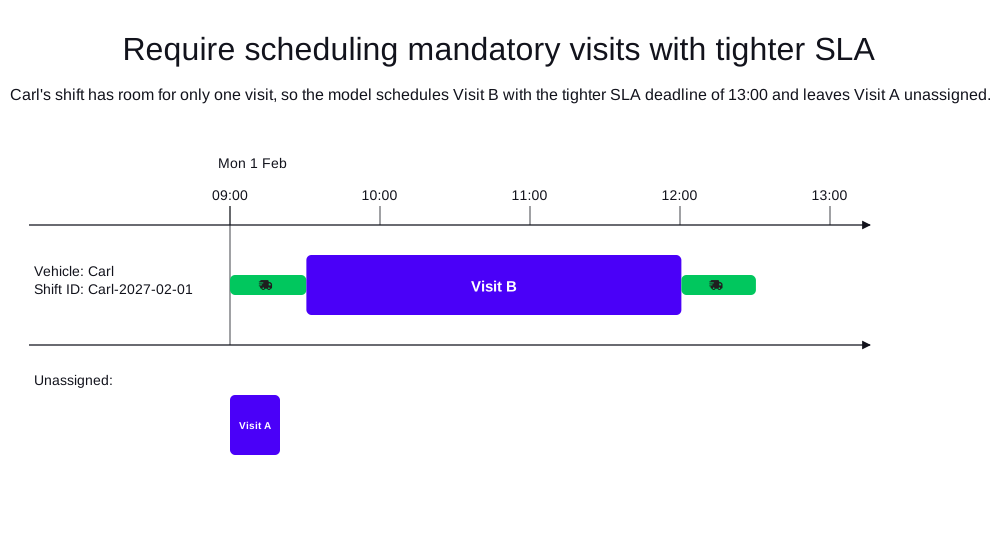
In this example, Carl works a shift from 09:00 to 13:00, which has room for only one of two visits that each take PT2H30M.
Both visits are mandatory and have the default priority, so their latestSlaEndTime decides which one is scheduled.
Visit A has a latestSlaEndTime of 17:00 and Visit B has a tighter latestSlaEndTime of 13:00.
With requireSchedulingMandatoryVisitsWithTighterSlaWeight enabled, the model assigns Visit B and leaves Visit A unassigned.
-
Input
-
Output
Try this example in Timefold Platform by saving the JSON into a file called sla-example-3.json and make the following API call:
|
curl -X POST -H "Content-type: application/json" -H 'X-API-KEY: <API_KEY>' https://app.timefold.ai/api/models/field-service-routing/v1/route-plans -d@sla-example-3.json{
"config": {
"run": {
"name": "Mandatory visit with tighter SLA"
},
"model": {
"overrides": {
"requireSchedulingMandatoryVisitsWithTighterSlaWeight": 1
}
}
},
"modelInput": {
"vehicles": [
{
"id": "Carl",
"shifts": [
{
"id": "Carl-2027-02-01",
"startLocation": [33.68786, -84.18487],
"minStartTime": "2027-02-01T09:00:00Z",
"maxEndTime": "2027-02-01T13:00:00Z"
}
]
}
],
"visits": [
{
"id": "Visit A",
"location": [33.74699, -84.02504],
"serviceDuration": "PT2H30M",
"latestSlaEndTime": "2027-02-01T17:00:00Z"
},
{
"id": "Visit B",
"location": [33.77301, -84.43838],
"serviceDuration": "PT2H30M",
"latestSlaEndTime": "2027-02-01T13:00:00Z"
}
],
"planningWindow": {
"startDate": "2027-02-01T00:00:00Z",
"endDate": "2027-02-02T00:00:00Z"
}
}
}
To request the solution, locate the ID from the response to the post operation and append it to the following API call:
|
curl -X GET -H 'X-API-KEY: <API_KEY>' https://app.timefold.ai/api/models/field-service-routing/v1/route-plans/<ID>{
"metadata": {
"id": "ID",
"originId": "ID",
"name": "Mandatory visit with tighter SLA",
"submitDateTime": "2026-09-10T03:34:11.263240206Z",
"startDateTime": "2026-09-10T03:35:14.908488216Z",
"activeDateTime": "2026-09-10T03:35:14.99511739Z",
"completeDateTime": "2026-09-10T03:35:45.412837254Z",
"shutdownDateTime": "2026-09-10T03:35:45.412842364Z",
"solverStatus": "SOLVING_COMPLETED",
"score": "0hard/-110000medium/-28822soft",
"tags": [
"system.type:from-request",
"system.profile:Standard profile"
],
"validationResult": {
"summary": "OK"
}
},
"modelOutput": {
"vehicles": [
{
"id": "Carl",
"shifts": [
{
"id": "Carl-2027-02-01",
"startTime": "2027-02-01T09:00:00Z",
"itinerary": [
{
"id": "Visit B",
"arrivalTime": "2027-02-01T09:30:33Z",
"startServiceTime": "2027-02-01T09:30:33Z",
"departureTime": "2027-02-01T12:00:33Z",
"effectiveServiceDuration": "PT2H30M",
"travelTimeFromPreviousStandstill": "PT30M33S",
"travelDistanceMetersFromPreviousStandstill": 31489,
"minStartTravelTime": "2027-02-01T00:00:00Z",
"kind": "VISIT"
}
],
"metrics": {
"totalServiceDuration": "PT2H30M",
"totalBreakDuration": "PT0S",
"totalWaitingTime": "PT0S",
"totalTravelTime": "PT1H22S",
"travelTimeFromStartLocationToFirstVisit": "PT30M33S",
"travelTimeBetweenVisits": "PT0S",
"travelTimeFromLastVisitToEndLocation": "PT29M49S",
"totalTravelDistanceMeters": 65496,
"travelDistanceFromStartLocationToFirstVisitMeters": 31489,
"travelDistanceBetweenVisitsMeters": 0,
"travelDistanceFromLastVisitToEndLocationMeters": 34007,
"endLocationArrivalTime": "2027-02-01T12:30:22Z",
"overtime": "PT0S",
"availableOvertime": "PT0S"
}
}
],
"metrics": {
"activatedShifts": 1,
"assignedVisits": 1,
"totalShiftDuration": "PT3H30M22S",
"totalServiceDuration": "PT2H30M",
"totalTravelTime": "PT1H22S",
"totalTravelDistanceMeters": 65496,
"totalBreakTime": "PT0S",
"totalWaitingTime": "PT0S",
"totalOvertime": "PT0S",
"availableOvertime": "PT0S"
}
}
],
"unassignedVisits": [
"Visit A"
]
},
"inputMetrics": {
"vehicles": 1,
"vehicleShifts": 1,
"visits": 2,
"mandatoryVisits": 2,
"optionalVisits": 0,
"pinnedVisits": 0,
"visitsWithSla": 2,
"visitGroups": 0,
"visitDependencies": 0,
"excludedVisits": 0,
"movableVisits": 0
},
"kpis": {
"averageTravelTimePerVisit": "PT1H22S",
"totalTravelTime": "PT1H22S",
"travelTimeFromStartLocationToFirstVisit": "PT30M33S",
"travelTimeBetweenVisits": "PT0S",
"travelTimeFromLastVisitToEndLocation": "PT29M49S",
"averageTravelDistanceMetersPerVisit": 65496,
"totalTravelDistanceMeters": 65496,
"travelDistanceFromStartLocationToFirstVisitMeters": 31489,
"travelDistanceBetweenVisitsMeters": 0,
"travelDistanceFromLastVisitToEndLocationMeters": 34007,
"totalUnassignedVisits": 1,
"totalAssignedVisits": 1,
"assignedMandatoryVisits": 1,
"unassignedMandatoryVisits": 1,
"totalActivatedVehicles": 1,
"workingTimeFairnessPercentage": 100,
"totalOvertime": "PT0S",
"availableOvertime": "PT0S",
"percentageVisitsInSla": 50,
"absoluteVisitsInSla": 1
},
"run": {
"id": "ID",
"originId": "ID",
"name": "Mandatory visit with tighter SLA",
"submitDateTime": "2026-09-10T03:34:11.263240206Z",
"startDateTime": "2026-09-10T03:35:14.908488216Z",
"activeDateTime": "2026-09-10T03:35:14.99511739Z",
"completeDateTime": "2026-09-10T03:35:45.412837254Z",
"shutdownDateTime": "2026-09-10T03:35:45.412842364Z",
"solverStatus": "SOLVING_COMPLETED",
"score": "0hard/-110000medium/-28822soft",
"tags": [
"system.type:from-request",
"system.profile:Standard profile"
],
"validationResult": {
"summary": "OK"
}
}
}3.2. Optional visits with tighter SLA example
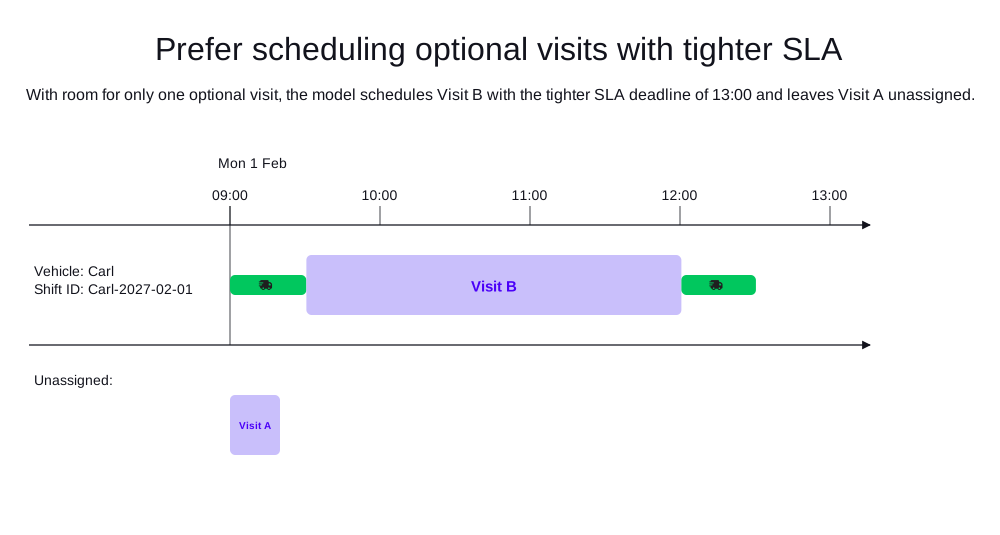
This example uses the same setup as the mandatory example, but both visits are optional with priority opt-6.
Carl works a shift from 09:00 to 13:00, which has room for only one of two visits that each take PT2H30M.
Visit A has a latestSlaEndTime of 17:00 and Visit B has a tighter latestSlaEndTime of 13:00.
With preferSchedulingOptionalVisitsWithTighterSlaWeight enabled, the model schedules Visit B and leaves Visit A unassigned.
-
Input
-
Output
Try this example in Timefold Platform by saving the JSON into a file called sla-example-4.json and make the following API call:
|
curl -X POST -H "Content-type: application/json" -H 'X-API-KEY: <API_KEY>' https://app.timefold.ai/api/models/field-service-routing/v1/route-plans -d@sla-example-4.json{
"config": {
"run": {
"name": "Optional visit with tighter SLA"
},
"model": {
"overrides": {
"preferSchedulingOptionalVisitsWithTighterSlaWeight": 1
}
}
},
"modelInput": {
"vehicles": [
{
"id": "Carl",
"shifts": [
{
"id": "Carl-2027-02-01",
"startLocation": [33.68786, -84.18487],
"minStartTime": "2027-02-01T09:00:00Z",
"maxEndTime": "2027-02-01T13:00:00Z"
}
]
}
],
"visits": [
{
"id": "Visit A",
"location": [33.74699, -84.02504],
"serviceDuration": "PT2H30M",
"priority": "opt-6",
"latestSlaEndTime": "2027-02-01T17:00:00Z"
},
{
"id": "Visit B",
"location": [33.77301, -84.43838],
"serviceDuration": "PT2H30M",
"priority": "opt-6",
"latestSlaEndTime": "2027-02-01T13:00:00Z"
}
],
"planningWindow": {
"startDate": "2027-02-01T00:00:00Z",
"endDate": "2027-02-02T00:00:00Z"
}
}
}
To request the solution, locate the ID from the response to the post operation and append it to the following API call:
|
curl -X GET -H 'X-API-KEY: <API_KEY>' https://app.timefold.ai/api/models/field-service-routing/v1/route-plans/<ID>{
"metadata": {
"id": "ID",
"originId": "ID",
"name": "Optional visit with tighter SLA",
"submitDateTime": "2026-09-10T03:34:27.892099762Z",
"startDateTime": "2026-09-10T03:35:15.799082737Z",
"activeDateTime": "2026-09-10T03:35:15.903110015Z",
"completeDateTime": "2026-09-10T03:35:46.359090092Z",
"shutdownDateTime": "2026-09-10T03:35:46.359094213Z",
"solverStatus": "SOLVING_COMPLETED",
"score": "0hard/0medium/-138822soft",
"tags": [
"system.type:from-request",
"system.profile:Standard profile"
],
"validationResult": {
"summary": "OK"
}
},
"modelOutput": {
"vehicles": [
{
"id": "Carl",
"shifts": [
{
"id": "Carl-2027-02-01",
"startTime": "2027-02-01T09:00:00Z",
"itinerary": [
{
"id": "Visit B",
"arrivalTime": "2027-02-01T09:30:33Z",
"startServiceTime": "2027-02-01T09:30:33Z",
"departureTime": "2027-02-01T12:00:33Z",
"effectiveServiceDuration": "PT2H30M",
"travelTimeFromPreviousStandstill": "PT30M33S",
"travelDistanceMetersFromPreviousStandstill": 31489,
"minStartTravelTime": "2027-02-01T00:00:00Z",
"kind": "VISIT"
}
],
"metrics": {
"totalServiceDuration": "PT2H30M",
"totalBreakDuration": "PT0S",
"totalWaitingTime": "PT0S",
"totalTravelTime": "PT1H22S",
"travelTimeFromStartLocationToFirstVisit": "PT30M33S",
"travelTimeBetweenVisits": "PT0S",
"travelTimeFromLastVisitToEndLocation": "PT29M49S",
"totalTravelDistanceMeters": 65496,
"travelDistanceFromStartLocationToFirstVisitMeters": 31489,
"travelDistanceBetweenVisitsMeters": 0,
"travelDistanceFromLastVisitToEndLocationMeters": 34007,
"endLocationArrivalTime": "2027-02-01T12:30:22Z",
"overtime": "PT0S",
"availableOvertime": "PT0S"
}
}
],
"metrics": {
"activatedShifts": 1,
"assignedVisits": 1,
"totalShiftDuration": "PT3H30M22S",
"totalServiceDuration": "PT2H30M",
"totalTravelTime": "PT1H22S",
"totalTravelDistanceMeters": 65496,
"totalBreakTime": "PT0S",
"totalWaitingTime": "PT0S",
"totalOvertime": "PT0S",
"availableOvertime": "PT0S"
}
}
],
"unassignedVisits": [
"Visit A"
]
},
"inputMetrics": {
"vehicles": 1,
"vehicleShifts": 1,
"visits": 2,
"mandatoryVisits": 0,
"optionalVisits": 2,
"pinnedVisits": 0,
"visitsWithSla": 2,
"visitGroups": 0,
"visitDependencies": 0,
"excludedVisits": 0,
"movableVisits": 0
},
"kpis": {
"averageTravelTimePerVisit": "PT1H22S",
"totalTravelTime": "PT1H22S",
"travelTimeFromStartLocationToFirstVisit": "PT30M33S",
"travelTimeBetweenVisits": "PT0S",
"travelTimeFromLastVisitToEndLocation": "PT29M49S",
"averageTravelDistanceMetersPerVisit": 65496,
"totalTravelDistanceMeters": 65496,
"travelDistanceFromStartLocationToFirstVisitMeters": 31489,
"travelDistanceBetweenVisitsMeters": 0,
"travelDistanceFromLastVisitToEndLocationMeters": 34007,
"totalUnassignedVisits": 1,
"totalAssignedVisits": 1,
"assignedMandatoryVisits": 0,
"unassignedMandatoryVisits": 0,
"assignedOptionalVisits": 1,
"unassignedOptionalVisits": 1,
"totalActivatedVehicles": 1,
"workingTimeFairnessPercentage": 100,
"totalOvertime": "PT0S",
"availableOvertime": "PT0S",
"percentageVisitsInSla": 50,
"absoluteVisitsInSla": 1
},
"run": {
"id": "ID",
"originId": "ID",
"name": "Optional visit with tighter SLA",
"submitDateTime": "2026-09-10T03:34:27.892099762Z",
"startDateTime": "2026-09-10T03:35:15.799082737Z",
"activeDateTime": "2026-09-10T03:35:15.903110015Z",
"completeDateTime": "2026-09-10T03:35:46.359090092Z",
"shutdownDateTime": "2026-09-10T03:35:46.359094213Z",
"solverStatus": "SOLVING_COMPLETED",
"score": "0hard/0medium/-138822soft",
"tags": [
"system.type:from-request",
"system.profile:Standard profile"
],
"validationResult": {
"summary": "OK"
}
}
}Next
-
See the full API spec, try the online API, or start a free trial.
-
Learn more about field service routing from our YouTube playlist.