Docs
  • Solver
  • Models
    • Field Service Routing
    • Employee Shift Scheduling
    • Pick-up and Delivery Routing
    • Task Scheduling
  • Platform
Start Free Trial
  • Field Service Routing
  • The basics
  • User guide
  • Efficiency X-Ray
  • latest
    • latest
    • 1.37.x
    • 1.36.x

Field Service Routing

  • The basics
    • Introduction
    • Getting started: Hello world
    • User guide
      • Terminology
      • Use case guide
      • Scheduling API concepts
      • Integration
      • Constraints
      • Using the API
        • Using the OpenAPI spec
        • API tooling
      • Demo datasets
      • Input datasets
        • Model configuration
        • Model input
        • Planning window
        • Time zones and daylight-saving time (DST)
      • Maps service
      • Input validation
      • Model response
      • Output datasets
        • Metadata
        • Model output
        • Input metrics
        • Key performance indicators (KPIs)
      • Key performance indicators (KPIs)
      • Metrics and optimization goals
      • Score analysis
      • Visualizations
      • Efficiency X-Ray
  • Feature guides
    • Vehicle resource constraints
      • Shift hours and overtime
      • Lunch breaks and personal appointments
      • Fairness
      • Route optimization
      • Technician costs
      • Technician ratings
      • Coverage area
    • Visit service constraints
      • Time windows and opening hours
      • Skills
      • Visit dependencies
      • Multi-vehicle visits
      • Multi-day schedules and movable visits
      • Priority visits and optional visits
      • Visit service level agreement (SLA)
      • Duration added for first visit on location
      • Visit profit
      • Visit requirements and tags
        • Visit requirements
        • Tags
    • Scenarios
      • Configuring labor law compliance
      • Ferry connections
      • Long-running visits
  • Responding to change
    • Manual intervention
    • Recommendations
      • Visit time window recommendations
      • Visit group time window recommendations
      • Bulk time window recommendations
    • Real-time planning
      • Real-time planning: extended visit
      • Real-time planning: reassignment
      • Real-time planning: emergency visit
      • Real-time planning: focused replanning
      • Real-time planning: no show
      • Real-time planning: technician ill
      • Real-time planning: pinning visits
      • Real-time planning: minimizing disruption on replanning
      • Real-time planning: actual arrival and departure times
    • Scenarios
      • Configuring labor law compliance
      • Ferry connections
      • Long-running visits
  • More information
    • FAQs
    • Changelog
    • Upgrade to the latest version
    • Feature requests

Efficiency X-Ray

Learn how to use the Efficiency X-Ray in the Field Service Routing model to compare how the vehicles use their time, distance, and overtime across an optimized routing plan. This view works at a strategic level and helps you identify fleet-wide utilization and balance issues rather than isolated problems.

By vehicle

This visualization is currently available as a preview feature. To request early access to this feature, contact us.

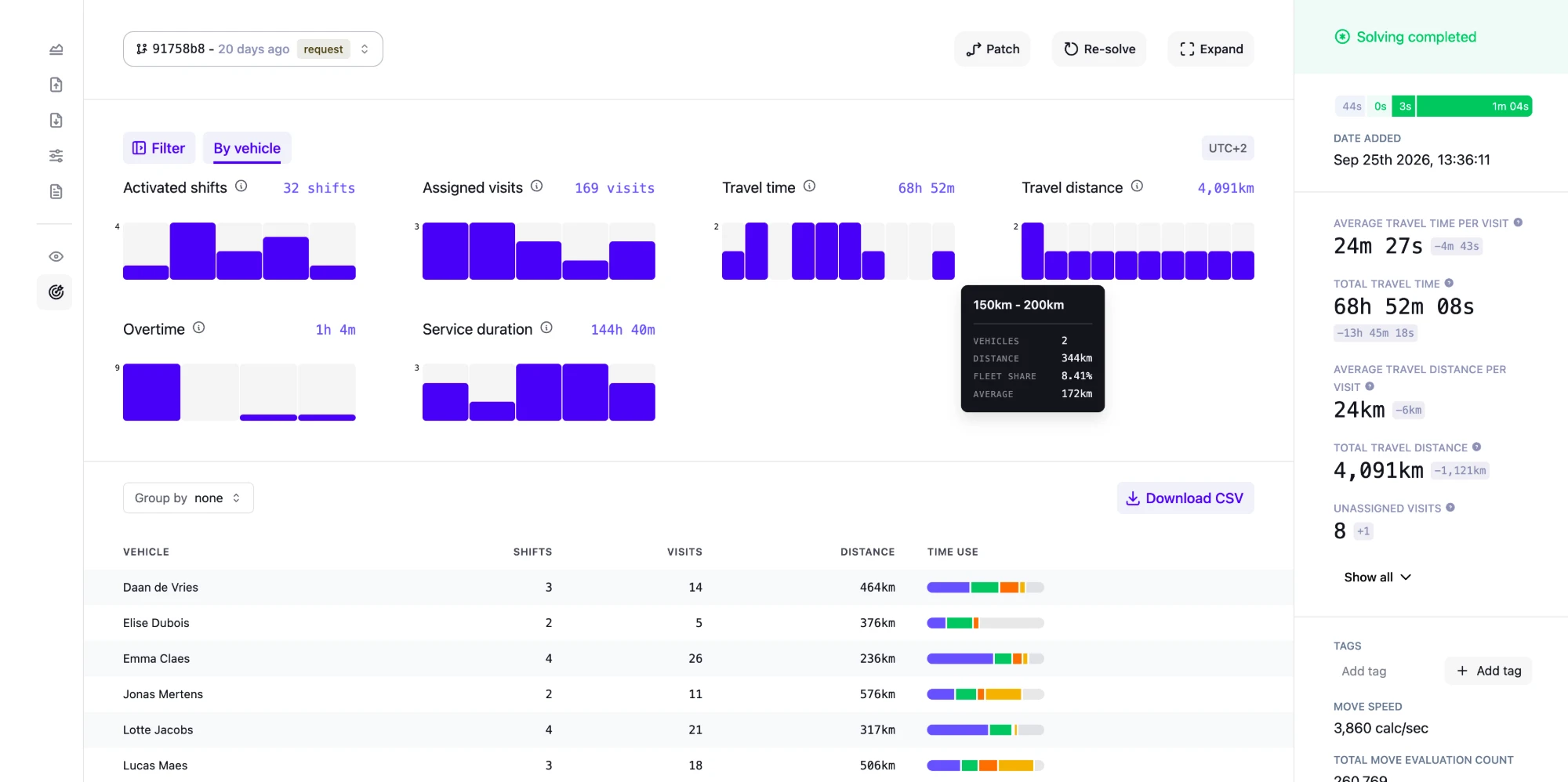
**By Vehicle** Efficiency X-Ray

Primary focus: Fleet utilization and balance.

The Efficiency X-Ray page has one By vehicle tab, which covers the whole dataset. Use the Filter pane to limit it to Vehicles, Skills, or Tags.

Distribution charts

The tab starts with six distribution charts, each with the fleet total as its headline:

Chart Shows

Activated shifts

How many of each vehicle’s shifts have at least one assigned visit.

Assigned visits

How many visits the model assigns to each vehicle.

Travel time

How long each vehicle travels, including the trips from and to each shift’s start and end locations.

Travel distance

How far each vehicle travels, including the trips from and to each shift’s start and end locations.

Overtime

How long each vehicle works past the normal end of its shifts.

Service duration

How much time each vehicle spends on service at its visits.

Averages can hide outliers, and the charts show how each value spreads across the vehicles. Hover over a bar to see its number of vehicles, their total, its Fleet share, and the Average.

Vehicle table

Below the charts, a table shows each vehicle’s shifts, visits, distance, and time use. Hover over a time use bar to see the vehicle’s time capacity, shift duration, available and used overtime, and its service, travel, waiting, and break time.

Use Group by to group the rows by skill or tag, and compare the groups. Click Download CSV to export the table.

When to use

Use the Efficiency X-Ray page when you want to:

  • Find vehicles with much more or much less work than the rest of the fleet.

  • Detect whether a specific skill or tag group travels more or works more overtime.

  • Compare travel time and distance across the fleet.

Other views

The Efficiency X-Ray shows structural patterns across the fleet, but it doesn’t explain a specific route or assignment.

To inspect a specific vehicle or visit, use Visualization.

For a structured approach that combines all views, see the recommended analysis workflow.

  • © 2026 Timefold BV
  • Timefold.ai
  • Documentation
  • Changelog
  • Send feedback
  • Privacy
  • Legal
    • Light mode
    • Dark mode
    • System default