Route optimization
By default, Timefold minimizes the amount of time technicians spend driving between visits. This lowers costs, reduces emissions, and makes technicians more productive as they spend less time driving and more time at visits. Reducing this travel, often called windshield time, raises technician utilization and the number of visits, or stops, completed per day.
Timefold can be configured to minimize travel distance.
Technicians can have different requirements or preferences regarding the maximum amount of travel time during their shifts.
When assigning visits, Timefold makes sure that such requirements and preferences are respected.
It is important to realize that limiting the maximum travel time may compete with other optimization goals, such as assigning all visits or fairness.
Maximum travel time can be set for a shift and per visit.
When maximum travel time is set for a shift, this limits the total time spent traveling in a shift. When maximum travel time is set per visit, this limits how much time technicians can spend driving to individual visits.
This guide explains how to limit a technician’s travel time with the following examples:
- 1. Minimize travel time
- 2. Minimize travel distance
- 3. Minimize waiting time
- 4. Prefer grouping co-located visits
- 5. Prefer grouping visits with consecutive group IDs
- 6. Required maximum shift travel time
- 7. Preferred maximum shift travel time
- 8. Maximum travel time per visit
- 9. Required maximum visits per shift
- 10. Preferred maximum visits per shift
- 11. Required reachable itineraries and visits
1. Minimize travel time
Learn how to configure an API Key to run the examples in this guide:
In the examples, replace |
The Minimize travel time soft constraint adds a soft score penalty to the dataset score for every second of travel in a route plan.
Timefold is incentivized to use the route plan with the best score.
Minimizing travel time is an optimization goal and is not typically used with the Minimize travel distance constraint.
|
Every soft constraint has a weight that can be configured to change the relative importance of the constraint compared to other constraints. Learn about constraint weights. |
The Minimize travel time constraint is accompanied by the Penalize inactive shift travel time constraint, which adds a soft score penalty for every second of travel time in a shift that has no visits assigned.
This is important for shifts that do not have the same start and end location or shifts that require a break with location.
Penalize inactive shift travel time constraint uses the same constraint weight as the Minimize travel time constraint.
2. Minimize travel distance
By default, the Minimize travel distance soft constraint is disabled with a constraint weight of 0.
When enabled the constraint adds a soft score penalty to the dataset score for every meter of travel in a route plan.
Timefold is incentivized to use the route plan with the best score.
Minimizing travel distance is an optimization goal and is not typically used with the Minimize travel time constraint.
|
Every soft constraint has a weight that can be configured to change the relative importance of the constraint compared to other constraints. Learn about constraint weights. |
The Minimize travel distance constraint is accompanied by the Penalize inactive shift travel distance constraint, which adds a soft score penalty for every meter of travel distance in a shift that has no visits assigned.
This is important for shifts that do not have the same start and end location or shifts that require a break with location.
Penalize inactive shift travel distance constraint uses the same constraint weight as the Minimize travel distance constraint.
3. Minimize waiting time
By default, the Minimize waiting time soft constraint is disabled.
When the constraint is active, it adds a soft score penalty to the dataset score for every second of waiting time in a route plan.
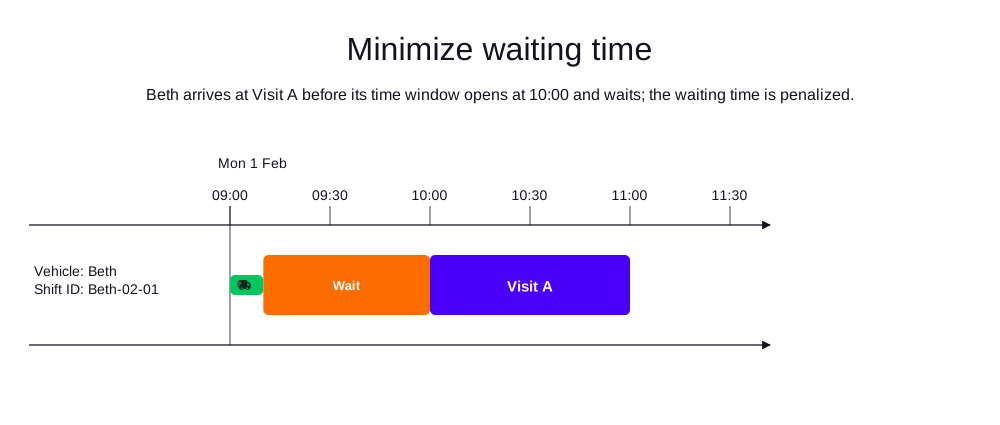
Waiting time occurs when a technician arrives at a visit before the visit’s time window starts and the technician has to wait until the service at the visit can begin. Timefold is incentivized to use the route plan with the best score.
In the following example, Beth arrives at Visit A before its time window opens at 10:00, so she waits before starting the service. The waiting time is penalized.
|
Every soft constraint has a weight that can be configured to change the relative importance of the constraint compared to other constraints. Learn about constraint weights. |
If you choose to activate both the minimize travel time and minimize waiting time constraints together, it’s important to consider how they will be balanced.
The default penalty units for waiting time and travel time are both expressed in seconds. If you assign equal weights to minimize waiting time and minimize travel time, the solver may treat one second of waiting as equally undesirable as one second of driving.
In practice, these two are rarely equivalent: travel time incurs fuel and maintenance costs, while waiting time (which is also undesirable) may be partially productive and less costly.
When configuring the weight of "minimize waiting time", consider it in relation to your existing "minimize travel time" weight. A higher waiting-time weight pushes the solver toward solutions with more driving and less waiting; a lower weight does the opposite.
4. Prefer grouping co-located visits
By default, the Prefer grouping co-located visits soft constraint is disabled with a constraint weight of 0.
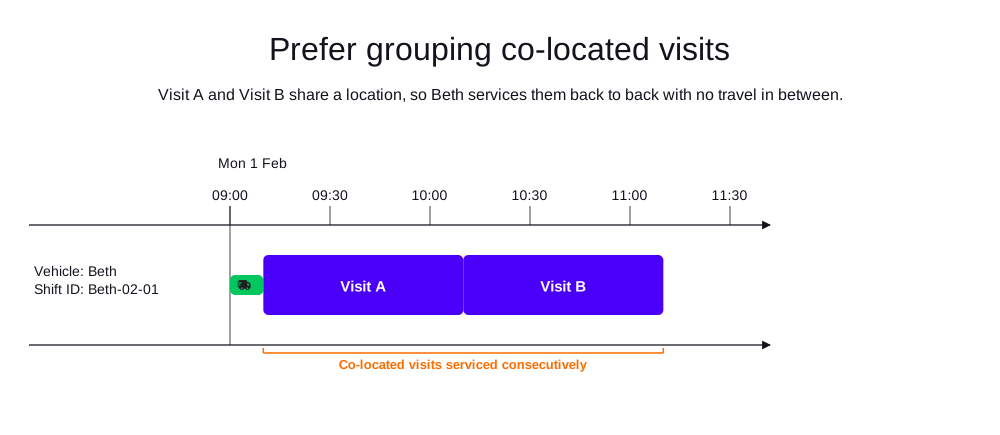
When enabled, the constraint adds a soft score reward to the dataset score for every pair of consecutive itinerary items (visits or breaks) with the same location in a route plan.
| Note that the soft score reward makes the score graph look different from what it looked like before enabling the constraint. |
Timefold is incentivized to use the route plan with the best score.
This way, you can encourage Timefold to assign visits with the same location to the same technician, which can be useful when you have multiple visits at the same location or when you want to encourage technicians to complete all work at a location before moving on to the next one.
In the following example, Visit A and Visit B share a location, so Beth services them back to back with no travel in between.
While Prefer grouping co-located visits is often used with the Minimize travel time or Minimize travel distance constraint, preferring grouping co-located visits can compete with other constraints, such as visits' preferred time windows or the preference to assign optional visits.
For this reason, the Prefer grouping co-located visits constraint should be enabled only if needed, such as when there are several visits at the same location in the dataset, and the technicians prefer handling all co-located visits in a batch.
In most cases, the Minimize travel time or Minimize travel distance constraint already takes care of grouping visits with the same location.
In order for the Prefer grouping co-located visits constraint to be effective, the constraint weight preferGroupingColocatedVisitsWeight should be high enough to incentivize Timefold to prefer such solutions over solutions that break this preference but better satisfy other constraints.
A good starting value is 10000, but depends on the specific dataset.
By default (preferGroupingColocatedVisitsRadiusMeters set to 0), two itinerary items are only considered co-located if they share the exact same location.
Some technicians visit multiple locations within the same building (for example different units or floors) that are geocoded with slightly different coordinates.
For this reason, preferGroupingColocatedVisitsRadiusMeters can be set to a positive straight-line distance (in meters) so that any two adjacent itinerary items within that distance of each other are also considered co-located, even when their locations are not exactly the same.
A typical value for this use case is 25 to 50 meters, and the radius is capped at a maximum of 200 meters.
If 200 meters is not enough to cover your use case, for example when visits that should be grouped together are spread across a larger site or are not geographically close at all, consider the Prefer grouping visits with consecutive group IDs constraint instead, which groups visits by an explicit group id rather than by distance.
{
  "model": {
    "overrides": {
      "preferGroupingColocatedVisitsWeight": 10000,
      "preferGroupingColocatedVisitsRadiusMeters": 50
    }
  }
}
The radius can also be overridden per vehicle shift or linked shift, by setting preferGroupingColocatedVisitsRadiusMeters directly on that shift.
This is useful when only some technicians (for example those working large campuses or industrial sites) need a wider radius than the rest of the fleet.
A shift-level radius, when set, always takes precedence over the global preferGroupingColocatedVisitsRadiusMeters override for routes taken by that shift.
{
  "vehicles": [
    {
      "id": "vehicle-1",
      "shifts": [
        {
          "id": "shift-1",
          "preferGroupingColocatedVisitsRadiusMeters": 100
        }
      ]
    }
  ]
}
5. Prefer grouping visits with consecutive group IDs
By default, the Prefer grouping visits in the same consecutive group soft constraint is disabled with a constraint weight of 0.
When enabled, the constraint adds a soft score reward to the dataset score for every pair of consecutive itinerary items (visits) with the same consecutive group ID in a route plan.
Visits can be assigned a preferredConsecutiveGroupId to indicate that they belong to a group of visits that should ideally be performed in sequence.
{
  "visits": [
    {
      "id": "v1",
      "preferredConsecutiveGroupId": "group1"
    }
  ]
}
Preferring grouping visits with the same consecutive group ID can be useful when you have multiple visits for the same overall client that need to be finished in sequence and the location of the visits are different. It might also be useful for cases where visits have similar tasks and require the same tools, so it is more efficient for a technician to complete them in sequence even if they are not co-located.
| Note that the soft score reward makes the score graph look different from what it looked like before enabling the constraint. |
Timefold is incentivized to use the route plan with the best score.
This way, you can encourage Timefold to assign visits with the same consecutive group ID to the same technician, which can be useful when you have multiple visits of the same overall client that need to be finished in sequence and the location of the visits is different.
While Prefer grouping visits in the same consecutive group is often used with the Minimize travel time or Minimize travel distance constraint, preferring grouping visits based on their consecutive group ID can compete with other constraints, such as visits' preferred time windows or the preference to assign optional visits.
For this reason, the Prefer grouping visits in the same consecutive group constraint should be enabled only if needed, such as when there are several visits at different locations, and the technicians prefer handling all visits of a consecutive group in a batch.
In order to enable the Prefer grouping visits in the same consecutive group constraint, the weight needs to be set to 1.
{
  "model": {
    "overrides": {
      "preferConsecutiveGroupWeight": 1
    }
  }
}
5.1. Prefer grouping visits with consecutive group IDs example
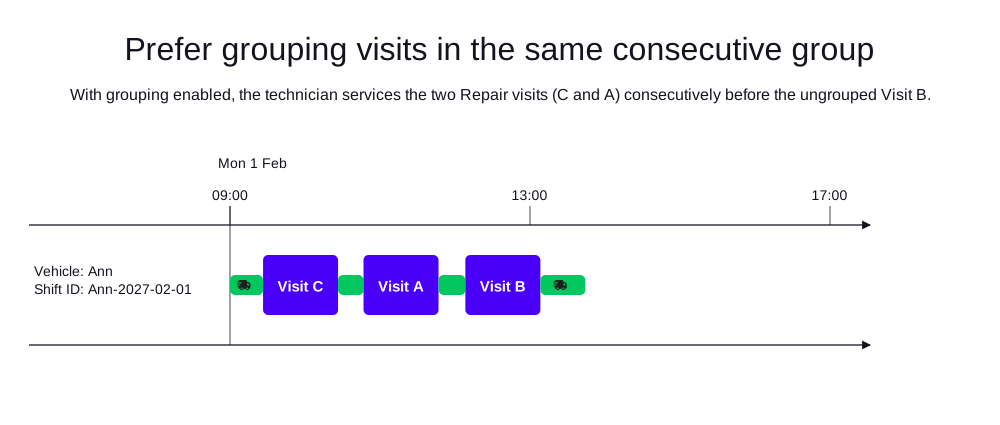
In the following example, there is one technician (Ann) with one shift and three visits.
Visit A and Visit C both belong to the consecutive group Repair, while Visit B is ungrouped and sits geographically between them.
Without this constraint, the travel-optimal order is Visit A, Visit B, Visit C, which splits the Repair group.
With preferConsecutiveGroupWeight set to 1, Timefold reorders the route so the two Repair visits are serviced consecutively, and Visit B is completed last.
The model accepts a small travel detour to earn the grouping reward.
The resulting score is 0hard/0medium/3745soft, which is the 10,000 reward for the consecutive Repair visits minus the 6,255 seconds of travel in the dataset.
-
Input
-
Output
Try this example in Timefold Platform by saving this JSON into a file called sample.json and make the following API call:
|
curl -X POST -H "Content-type: application/json" -H 'X-API-KEY: <API_KEY>' https://app.timefold.ai/api/models/field-service-routing/v1/route-plans -d@sample.json{
"config": {
"run": {
"name": "Prefer grouping visits in the same consecutive group example"
},
"model": {
"overrides": {
"preferConsecutiveGroupWeight": 1
}
}
},
"modelInput": {
"vehicles": [
{
"id": "Ann",
"shifts": [
{
"id": "Ann-2027-02-01",
"startLocation": [33.60000, -84.35000],
"endLocation": [33.60000, -84.35000],
"minStartTime": "2027-02-01T09:00:00Z",
"maxEndTime": "2027-02-01T17:00:00Z"
}
]
}
],
"visits": [
{
"id": "Visit A",
"location": [33.75000, -84.45000],
"serviceDuration": "PT1H",
"preferredConsecutiveGroupId": "Repair"
},
{
"id": "Visit B",
"location": [33.85000, -84.35000],
"serviceDuration": "PT1H"
},
{
"id": "Visit C",
"location": [33.75000, -84.25000],
"serviceDuration": "PT1H",
"preferredConsecutiveGroupId": "Repair"
}
],
"planningWindow": {
"startDate": "2027-02-01T00:00:00Z",
"endDate": "2027-02-02T00:00:00Z"
}
}
}
To request the solution, locate the ID from the response to the post operation and append it to the following API call:
|
curl -X GET -H 'X-API-KEY: <API_KEY>' https://app.timefold.ai/api/models/field-service-routing/v1/route-plans/<ID>{
"metadata": {
"id": "ID",
"originId": "ID",
"name": "Prefer grouping visits in the same consecutive group example",
"submitDateTime": "2026-09-17T05:38:50.252796417Z",
"startDateTime": "2026-09-17T05:39:48.247219778Z",
"activeDateTime": "2026-09-17T05:39:48.351472878Z",
"completeDateTime": "2026-09-17T05:40:18.874897407Z",
"shutdownDateTime": "2026-09-17T05:40:18.874903923Z",
"solverStatus": "SOLVING_COMPLETED",
"score": "0hard/0medium/3745soft",
"tags": [
"system.type:from-request",
"system.profile:Standard profile"
],
"validationResult": {
"summary": "OK"
}
},
"modelOutput": {
"vehicles": [
{
"id": "Ann",
"shifts": [
{
"id": "Ann-2027-02-01",
"startTime": "2027-02-01T09:00:00Z",
"itinerary": [
{
"id": "Visit C",
"arrivalTime": "2027-02-01T09:26:27Z",
"startServiceTime": "2027-02-01T09:26:27Z",
"departureTime": "2027-02-01T10:26:27Z",
"effectiveServiceDuration": "PT1H",
"travelTimeFromPreviousStandstill": "PT26M27S",
"travelDistanceMetersFromPreviousStandstill": 27589,
"minStartTravelTime": "2027-02-01T00:00:00Z",
"kind": "VISIT"
},
{
"id": "Visit A",
"arrivalTime": "2027-02-01T10:46:49Z",
"startServiceTime": "2027-02-01T10:46:49Z",
"departureTime": "2027-02-01T11:46:49Z",
"effectiveServiceDuration": "PT1H",
"travelTimeFromPreviousStandstill": "PT20M22S",
"travelDistanceMetersFromPreviousStandstill": 20397,
"minStartTravelTime": "2027-02-01T00:00:00Z",
"kind": "VISIT"
},
{
"id": "Visit B",
"arrivalTime": "2027-02-01T12:08:17Z",
"startServiceTime": "2027-02-01T12:08:17Z",
"departureTime": "2027-02-01T13:08:17Z",
"effectiveServiceDuration": "PT1H",
"travelTimeFromPreviousStandstill": "PT21M28S",
"travelDistanceMetersFromPreviousStandstill": 19416,
"minStartTravelTime": "2027-02-01T00:00:00Z",
"kind": "VISIT"
}
],
"metrics": {
"totalServiceDuration": "PT3H",
"totalBreakDuration": "PT0S",
"totalWaitingTime": "PT0S",
"totalTravelTime": "PT1H44M15S",
"travelTimeFromStartLocationToFirstVisit": "PT26M27S",
"travelTimeBetweenVisits": "PT41M50S",
"travelTimeFromLastVisitToEndLocation": "PT35M58S",
"totalTravelDistanceMeters": 102916,
"travelDistanceFromStartLocationToFirstVisitMeters": 27589,
"travelDistanceBetweenVisitsMeters": 39813,
"travelDistanceFromLastVisitToEndLocationMeters": 35514,
"endLocationArrivalTime": "2027-02-01T13:44:15Z",
"overtime": "PT0S",
"availableOvertime": "PT0S"
}
}
],
"metrics": {
"activatedShifts": 1,
"assignedVisits": 3,
"totalShiftDuration": "PT4H44M15S",
"totalServiceDuration": "PT3H",
"totalTravelTime": "PT1H44M15S",
"totalTravelDistanceMeters": 102916,
"totalBreakTime": "PT0S",
"totalWaitingTime": "PT0S",
"totalOvertime": "PT0S",
"availableOvertime": "PT0S"
}
}
],
"unassignedVisits": []
},
"inputMetrics": {
"vehicles": 1,
"vehicleShifts": 1,
"visits": 3,
"mandatoryVisits": 3,
"optionalVisits": 0,
"pinnedVisits": 0,
"visitsWithSla": 0,
"visitGroups": 0,
"visitDependencies": 0,
"excludedVisits": 0,
"movableVisits": 0
},
"kpis": {
"averageTravelTimePerVisit": "PT34M45S",
"totalTravelTime": "PT1H44M15S",
"travelTimeFromStartLocationToFirstVisit": "PT26M27S",
"travelTimeBetweenVisits": "PT41M50S",
"travelTimeFromLastVisitToEndLocation": "PT35M58S",
"averageTravelDistanceMetersPerVisit": 34305,
"totalTravelDistanceMeters": 102916,
"travelDistanceFromStartLocationToFirstVisitMeters": 27589,
"travelDistanceBetweenVisitsMeters": 39813,
"travelDistanceFromLastVisitToEndLocationMeters": 35514,
"totalUnassignedVisits": 0,
"totalAssignedVisits": 3,
"assignedMandatoryVisits": 3,
"unassignedMandatoryVisits": 0,
"totalActivatedVehicles": 1,
"workingTimeFairnessPercentage": 100,
"totalOvertime": "PT0S",
"availableOvertime": "PT0S"
},
"run": {
"id": "ID",
"originId": "ID",
"name": "Prefer grouping visits in the same consecutive group example",
"submitDateTime": "2026-09-17T05:38:50.252796417Z",
"startDateTime": "2026-09-17T05:39:48.247219778Z",
"activeDateTime": "2026-09-17T05:39:48.351472878Z",
"completeDateTime": "2026-09-17T05:40:18.874897407Z",
"shutdownDateTime": "2026-09-17T05:40:18.874903923Z",
"solverStatus": "SOLVING_COMPLETED",
"score": "0hard/0medium/3745soft",
"tags": [
"system.type:from-request",
"system.profile:Standard profile"
],
"validationResult": {
"summary": "OK"
}
}
}6. Required maximum shift travel time
A vehicle shift’s maxTravelTime property defines the maximum amount of allowed travel time (in ISO 8601 duration format) for the whole shift.
{
  "shifts": [
    {
      "id": "Beth-02-01",
      "startLocation": [33.70450, -84.34881],
      "endLocation": [33.70450, -84.34881],
      "minStartTime": "2027-01-01T09:00:00Z",
      "maxLastVisitDepartureTime": "2027-01-01T17:00:00Z",
      "maxTravelTime": "PT1H"
    }
  ]
}
Travel time includes:
-
Travel from the shift’s start location to the first visit.
-
Travel between visits.
-
Travel from the last visit back to the shift’s end location.
-
Travel to and from any fixed breaks with a provided location.
The Max shift travel time (hard) constraint is triggered if the total travel time of a vehicle shift exceeds the limit specified in maxTravelTime.
Visits will be left unassigned, if assigning them breaks this constraint.
6.1. Required maximum shift travel time example
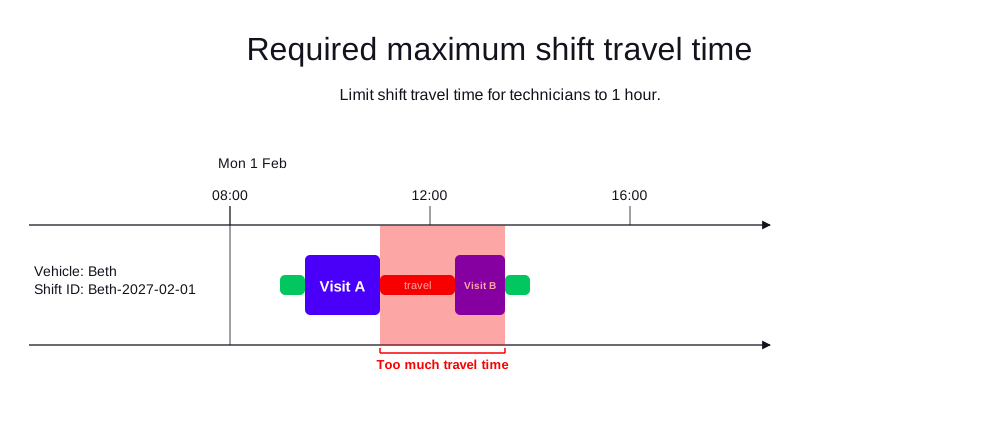
In the following example, there are two visits and one technician (Beth).
Beth’s shift has a maximum travel time of one hour ("maxTravelTime": "PT1H").
Timefold only assigns one visit to Beth because traveling to both visits would exceed the maximum required travel time for Beth’s shift.
-
Input
-
Output
Try this example in Timefold Platform by saving this JSON into a file called sample.json and make the following API call:
|
curl -X POST -H "Content-type: application/json" -H 'X-API-KEY: <API_KEY>' https://app.timefold.ai/api/models/field-service-routing/v1/route-plans -d@sample.json{
"config": {
"run": {
"name": "Required maximum shift travel time example"
}
},
"modelInput": {
"vehicles": [
{
"id": "Beth",
"vehicleType": "VAN",
"shifts": [
{
"id": "Beth-02-01",
"startLocation": [33.70450, -84.34881],
"endLocation": [33.70450, -84.34881],
"minStartTime": "2027-01-01T09:00:00Z",
"maxLastVisitDepartureTime": "2027-01-01T17:00:00Z",
"maxTravelTime": "PT1H"
}
]
}
],
"visits": [
{
"id": "Visit A",
"location": [33.72349, -84.56957],
"serviceDuration": "PT2H"
},
{
"id": "Visit B",
"location": [33.91554, -84.45041],
"serviceDuration": "PT2H"
}
]
}
}
To request the solution, locate the ID from the response to the post operation and append it to the following API call:
|
curl -X GET -H 'X-API-KEY: <API_KEY>' https://app.timefold.ai/api/models/field-service-routing/v1/route-plans/<ID>{
"metadata": {
"id": "ID",
"parentId": null,
"originId": "ID",
"name": "Required maximum shift travel time example",
"submitDateTime": "2025-07-24T08:24:44.271812726Z",
"startDateTime": "2025-07-24T08:24:56.452742647Z",
"activeDateTime": "2025-07-24T08:24:57.074439654Z",
"completeDateTime": "2025-07-24T08:25:27.393239568Z",
"shutdownDateTime": "2025-07-24T08:25:27.689478216Z",
"solverStatus": "SOLVING_COMPLETED",
"score": "0hard/-10000medium/-3006soft",
"tags": [
"system.type:from-request",
"system.profile:default"
],
"validationResult": {
"summary": "OK"
}
},
"modelOutput": {
"vehicles": [
{
"id": "Beth",
"shifts": [
{
"id": "Beth-02-01",
"startTime": "2027-01-01T09:00:00Z",
"itinerary": [
{
"id": "Visit A",
"kind": "VISIT",
"arrivalTime": "2027-01-01T09:24:59Z",
"startServiceTime": "2027-01-01T09:24:59Z",
"departureTime": "2027-01-01T11:24:59Z",
"effectiveServiceDuration": "PT2H",
"travelTimeFromPreviousStandstill": "PT24M59S",
"travelDistanceMetersFromPreviousStandstill": 24329,
"minStartTravelTime": "2027-01-01T00:00:00Z"
}
],
"metrics": {
"totalTravelTime": "PT50M6S",
"travelTimeFromStartLocationToFirstVisit": "PT24M59S",
"travelTimeBetweenVisits": "PT0S",
"travelTimeFromLastVisitToEndLocation": "PT25M7S",
"totalTravelDistanceMeters": 48715,
"travelDistanceFromStartLocationToFirstVisitMeters": 24329,
"travelDistanceBetweenVisitsMeters": 0,
"travelDistanceFromLastVisitToEndLocationMeters": 24386,
"endLocationArrivalTime": "2027-01-01T11:50:06Z"
}
}
]
}
]
},
"inputMetrics": {
"visits": 2,
"visitGroups": 0,
"vehicles": 1,
"mandatoryVisits": 2,
"optionalVisits": 0,
"vehicleShifts": 1,
"visitsWithSla": 0
},
"kpis": {
"totalTravelTime": "PT50M6S",
"travelTimeFromStartLocationToFirstVisit": "PT24M59S",
"travelTimeBetweenVisits": "PT0S",
"travelTimeFromLastVisitToEndLocation": "PT25M7S",
"totalTravelDistanceMeters": 48715,
"travelDistanceFromStartLocationToFirstVisitMeters": 24329,
"travelDistanceBetweenVisitsMeters": 0,
"travelDistanceFromLastVisitToEndLocationMeters": 24386,
"totalUnassignedVisits": 1,
"totalAssignedVisits": 1,
"assignedMandatoryVisits": 1,
"assignedOptionalVisits": 0,
"totalActivatedVehicles": 1,
"workingTimeFairnessPercentage": 100.0
}
}7. Preferred maximum shift travel time
A vehicle shift’s maxSoftTravelTime property defines the preferred maximum amount of travel time (in ISO 8601 duration format) for the whole shift.
{
  "shifts": [
    {
      "id": "Beth-02-01",
      "startLocation": [33.70450, -84.34881],
      "endLocation": [33.70450, -84.34881],
      "minStartTime": "2027-01-01T09:00:00Z",
      "maxLastVisitDepartureTime": "2027-01-01T17:00:00Z",
      "maxSoftTravelTime": "PT1H"
    }
  ]
}
Travel time includes:
-
Travel from the shift’s start location to the first visit.
-
Travel between visits.
-
Travel from the last visit back to the shift’s end location.
-
Travel to and from any fixed breaks with a provided location.
The Max shift travel time (soft) is triggered when the total travel time of a vehicle shift exceeds the limit specified in maxSoftTravelTime.
Visits will still be assigned if they break this constraint, but the solution is penalized with a soft score penalty proportionally to the exceeding travel time in seconds, incentivizing Timefold to find the best solution.
If you use this soft limit in combination with a hard limit, make sure to set the soft limit (maxSoftTravelTime) to an earlier time than the corresponding hard limit (maxTraveltime).
|
Every soft constraint has a weight that can be configured to change the relative importance of the constraint compared to other constraints. Learn about constraint weights. |
7.1. Preferred maximum shift travel time example
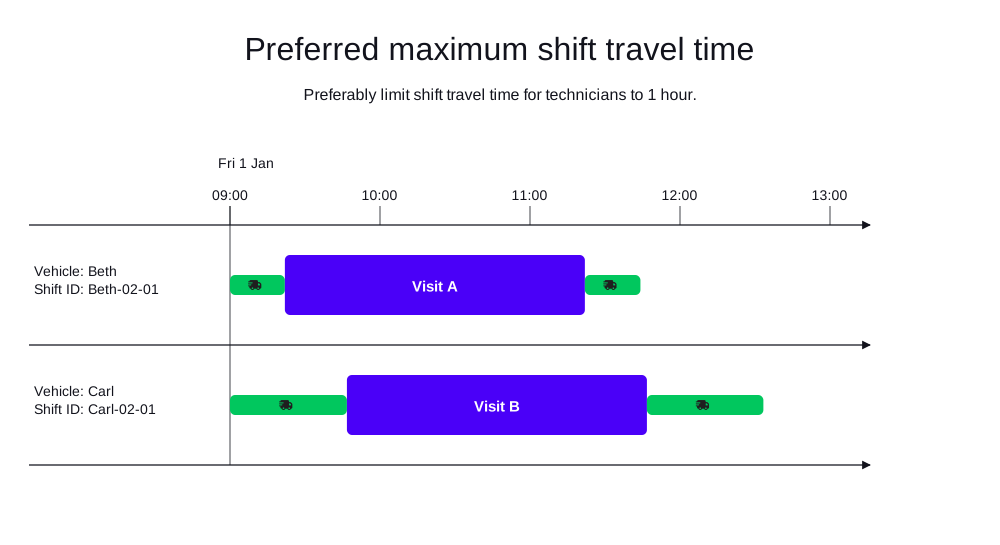
In the following example, there are two visits and two technicians (Beth and Carl). Beth’s and Carl’s shifts each have a preferred maximum travel time of one hour ("maxSoftTravelTime": "PT1H").
Beth and Carl are assigned one visit each.
Beth’s total travel time is 44 minutes. Carl’s total travel time is one hour and 33 minutes, which is above the preferred maximum travel time of one hour, however, assigning one visit each to Beth and Carl resulted in a lower soft score penalty than assigning both visits to a single technician would have.
-
Input
-
Output
Try this example in Timefold Platform by saving this JSON into a file called sample.json and make the following API call:
|
curl -X POST -H "Content-type: application/json" -H 'X-API-KEY: <API_KEY>' https://app.timefold.ai/api/models/field-service-routing/v1/route-plans -d@sample.json{
"config": {
"run": {
"name": "Preferred maximum shift travel time example"
}
},
"modelInput": {
"vehicles": [
{
"id": "Beth",
"vehicleType": "VAN",
"shifts": [
{
"id": "Beth-02-01",
"startLocation": [33.70450, -84.34881],
"endLocation": [33.70450, -84.34881],
"minStartTime": "2027-01-01T09:00:00Z",
"maxLastVisitDepartureTime": "2027-01-01T17:00:00Z",
"maxSoftTravelTime": "PT1H"
}
]
},
{
"id": "Carl",
"vehicleType": "VAN",
"shifts": [
{
"id": "Carl-02-01",
"startLocation": [33.70450, -84.34881],
"endLocation": [33.70450, -84.34881],
"minStartTime": "2027-01-01T09:00:00Z",
"maxLastVisitDepartureTime": "2027-01-01T17:00:00Z",
"maxSoftTravelTime": "PT1H"
}
]
}
],
"visits": [
{
"id": "Visit A",
"location": [33.71541, -84.51106],
"serviceDuration": "PT2H"
},
{
"id": "Visit B",
"location": [33.84246, -83.98872],
"serviceDuration": "PT2H"
}
],
"planningWindow": {
"startDate": "2027-01-01T00:00:00Z",
"endDate": "2027-01-02T00:00:00Z"
}
}
}
To request the solution, locate the ID from the response to the post operation and append it to the following API call:
|
curl -X GET -H 'X-API-KEY: <API_KEY>' https://app.timefold.ai/api/models/field-service-routing/v1/route-plans/<ID>{
"metadata": {
"id": "ID",
"parentId": null,
"originId": "ID",
"name": "Preferred maximum shift travel time example",
"submitDateTime": "2025-07-24T08:43:26.732481985Z",
"startDateTime": "2025-07-24T08:43:38.02015025Z",
"activeDateTime": "2025-07-24T08:43:38.754131801Z",
"completeDateTime": "2025-07-24T08:44:09.082771011Z",
"shutdownDateTime": "2025-07-24T08:44:09.540141679Z",
"solverStatus": "SOLVING_COMPLETED",
"score": "0hard/0medium/-10324soft",
"tags": [
"system.type:from-request",
"system.profile:default"
],
"validationResult": {
"summary": "OK"
}
},
"modelOutput": {
"vehicles": [
{
"id": "Beth",
"shifts": [
{
"id": "Beth-02-01",
"startTime": "2027-01-01T09:00:00Z",
"itinerary": [
{
"id": "Visit A",
"kind": "VISIT",
"arrivalTime": "2027-01-01T09:21:57Z",
"startServiceTime": "2027-01-01T09:21:57Z",
"departureTime": "2027-01-01T11:21:57Z",
"effectiveServiceDuration": "PT2H",
"travelTimeFromPreviousStandstill": "PT21M57S",
"travelDistanceMetersFromPreviousStandstill": 19813,
"minStartTravelTime": "2027-01-01T00:00:00Z"
}
],
"metrics": {
"totalTravelTime": "PT44M10S",
"travelTimeFromStartLocationToFirstVisit": "PT21M57S",
"travelTimeBetweenVisits": "PT0S",
"travelTimeFromLastVisitToEndLocation": "PT22M13S",
"totalTravelDistanceMeters": 39691,
"travelDistanceFromStartLocationToFirstVisitMeters": 19813,
"travelDistanceBetweenVisitsMeters": 0,
"travelDistanceFromLastVisitToEndLocationMeters": 19878,
"endLocationArrivalTime": "2027-01-01T11:44:10Z"
}
}
]
},
{
"id": "Carl",
"shifts": [
{
"id": "Carl-02-01",
"startTime": "2027-01-01T09:00:00Z",
"itinerary": [
{
"id": "Visit B",
"kind": "VISIT",
"arrivalTime": "2027-01-01T09:46:46Z",
"startServiceTime": "2027-01-01T09:46:46Z",
"departureTime": "2027-01-01T11:46:46Z",
"effectiveServiceDuration": "PT2H",
"travelTimeFromPreviousStandstill": "PT46M46S",
"travelDistanceMetersFromPreviousStandstill": 43612,
"minStartTravelTime": "2027-01-01T00:00:00Z"
}
],
"metrics": {
"totalTravelTime": "PT1H33M21S",
"travelTimeFromStartLocationToFirstVisit": "PT46M46S",
"travelTimeBetweenVisits": "PT0S",
"travelTimeFromLastVisitToEndLocation": "PT46M35S",
"totalTravelDistanceMeters": 87332,
"travelDistanceFromStartLocationToFirstVisitMeters": 43612,
"travelDistanceBetweenVisitsMeters": 0,
"travelDistanceFromLastVisitToEndLocationMeters": 43720,
"endLocationArrivalTime": "2027-01-01T12:33:21Z"
}
}
]
}
]
},
"inputMetrics": {
"visits": 2,
"visitGroups": 0,
"vehicles": 2,
"mandatoryVisits": 2,
"optionalVisits": 0,
"vehicleShifts": 2,
"visitsWithSla": 0
},
"kpis": {
"totalTravelTime": "PT2H17M31S",
"travelTimeFromStartLocationToFirstVisit": "PT1H8M43S",
"travelTimeBetweenVisits": "PT0S",
"travelTimeFromLastVisitToEndLocation": "PT1H8M48S",
"totalTravelDistanceMeters": 127023,
"travelDistanceFromStartLocationToFirstVisitMeters": 63425,
"travelDistanceBetweenVisitsMeters": 0,
"travelDistanceFromLastVisitToEndLocationMeters": 63598,
"totalUnassignedVisits": 0,
"totalAssignedVisits": 2,
"assignedMandatoryVisits": 2,
"assignedOptionalVisits": 0,
"totalActivatedVehicles": 2,
"workingTimeFairnessPercentage": 86.97
}
}8. Maximum travel time per visit
A vehicle shift’s maxTravelTimePerVisit property defines the maximum amount of allowed travel time (in ISO 8601 duration format) per visit.
{
  "shifts": [
    {
      "id": "Beth-02-01",
      "startLocation": [33.70450, -84.34881],
      "endLocation": [33.70450, -84.34881],
      "minStartTime": "2027-01-01T09:00:00Z",
      "maxLastVisitDepartureTime": "2027-01-01T17:00:00Z",
      "maxTravelTimePerVisit": "PT45M"
    }
  ]
}
Travel time per visit includes the total travel time from the previous location, including:
-
Visits
-
Breaks with a location
The Max travel time per visit (hard) constraint is triggered when the travel time from the previous location exceeds the limit specified in maxTravelTimePerVisit.
Visits in distant locations may be left unassigned if no technician is ever close enough to make the trip in less time than the limit specified in maxTravelTimePerVisit.
8.1. Maximum travel time per visit example
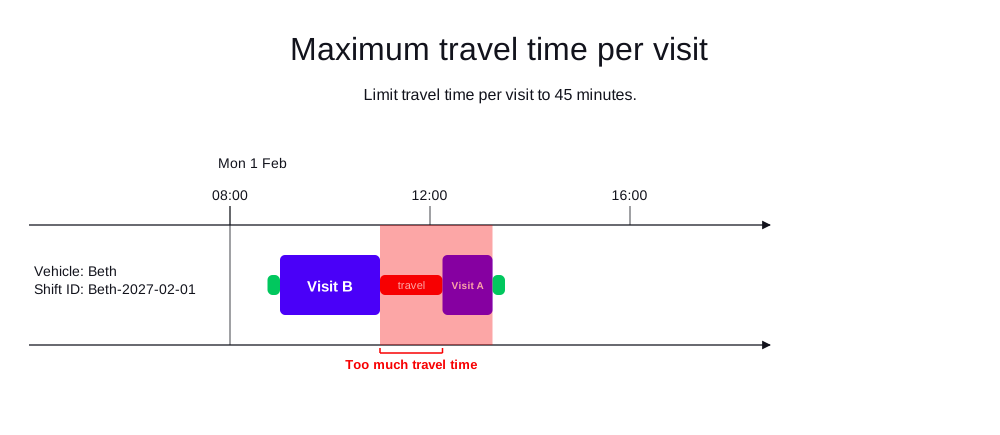
In the following example, there are two visits and one technician (Beth) with one shift.
Beth’s shift has a maxTravelTimePerVisit of 45 minutes.
Visit B is assigned to Beth because it takes less than 45 minutes to reach.
Visit A is not assigned because it would take longer than 45 minutes to reach.
-
Input
-
Output
Try this example in Timefold Platform by saving this JSON into a file called sample.json and make the following API call:
|
curl -X POST -H "Content-type: application/json" -H 'X-API-KEY: <API_KEY>' https://app.timefold.ai/api/models/field-service-routing/v1/route-plans -d@sample.json{
"config": {
"run": {
"name": "Maximum travel time per visit example"
}
},
"modelInput": {
"vehicles": [
{
"id": "Beth",
"vehicleType": "VAN",
"shifts": [
{
"id": "Beth-02-01",
"startLocation": [33.70450, -84.34881],
"endLocation": [33.70450, -84.34881],
"minStartTime": "2027-01-01T09:00:00Z",
"maxLastVisitDepartureTime": "2027-01-01T17:00:00Z",
"maxTravelTimePerVisit": "PT45M"
}
]
}
],
"visits": [
{
"id": "Visit A",
"location": [33.69831, -85.01223],
"serviceDuration": "PT2H"
},
{
"id": "Visit B",
"location": [33.91554, -84.45041],
"serviceDuration": "PT2H"
}
]
}
}
To request the solution, locate the ID from the response to the post operation and append it to the following API call:
|
curl -X GET -H 'X-API-KEY: <API_KEY>' https://app.timefold.ai/api/models/field-service-routing/v1/route-plans/<ID>{
"metadata": {
"id": "ID",
"parentId": null,
"originId": "ID",
"name": "Maximum travel time per visit example",
"submitDateTime": "2025-07-24T09:59:21.889699336Z",
"startDateTime": "2025-07-24T09:59:32.978573637Z",
"activeDateTime": "2025-07-24T09:59:33.494204576Z",
"completeDateTime": "2025-07-24T10:00:03.803690032Z",
"shutdownDateTime": "2025-07-24T10:00:04.104819785Z",
"solverStatus": "SOLVING_COMPLETED",
"score": "0hard/-10000medium/-3697soft",
"tags": [
"system.type:from-request",
"system.profile:default"
],
"validationResult": {
"summary": "OK"
}
},
"modelOutput": {
"vehicles": [
{
"id": "Beth",
"shifts": [
{
"id": "Beth-02-01",
"startTime": "2027-01-01T09:00:00Z",
"itinerary": [
{
"id": "Visit B",
"kind": "VISIT",
"arrivalTime": "2027-01-01T09:30:42Z",
"startServiceTime": "2027-01-01T09:30:42Z",
"departureTime": "2027-01-01T11:30:42Z",
"effectiveServiceDuration": "PT2H",
"travelTimeFromPreviousStandstill": "PT30M42S",
"travelDistanceMetersFromPreviousStandstill": 30631,
"minStartTravelTime": "2027-01-01T00:00:00Z"
}
],
"metrics": {
"totalTravelTime": "PT1H1M37S",
"travelTimeFromStartLocationToFirstVisit": "PT30M42S",
"travelTimeBetweenVisits": "PT0S",
"travelTimeFromLastVisitToEndLocation": "PT30M55S",
"totalTravelDistanceMeters": 61596,
"travelDistanceFromStartLocationToFirstVisitMeters": 30631,
"travelDistanceBetweenVisitsMeters": 0,
"travelDistanceFromLastVisitToEndLocationMeters": 30965,
"endLocationArrivalTime": "2027-01-01T12:01:37Z"
}
}
]
}
]
},
"inputMetrics": {
"visits": 2,
"visitGroups": 0,
"vehicles": 1,
"mandatoryVisits": 2,
"optionalVisits": 0,
"vehicleShifts": 1,
"visitsWithSla": 0
},
"kpis": {
"totalTravelTime": "PT1H1M37S",
"travelTimeFromStartLocationToFirstVisit": "PT30M42S",
"travelTimeBetweenVisits": "PT0S",
"travelTimeFromLastVisitToEndLocation": "PT30M55S",
"totalTravelDistanceMeters": 61596,
"travelDistanceFromStartLocationToFirstVisitMeters": 30631,
"travelDistanceBetweenVisitsMeters": 0,
"travelDistanceFromLastVisitToEndLocationMeters": 30965,
"totalUnassignedVisits": 1,
"totalAssignedVisits": 1,
"assignedMandatoryVisits": 1,
"assignedOptionalVisits": 0,
"totalActivatedVehicles": 1,
"workingTimeFairnessPercentage": 100.0
}
}9. Required maximum visits per shift
A vehicle shift’s maxVisits property defines the maximum number of visits that can be assigned to the shift.
{
  "shifts": [
    {
      "id": "Beth-02-01",
      "startLocation": [33.70450, -84.34881],
      "endLocation": [33.70450, -84.34881],
      "minStartTime": "2027-01-01T09:00:00Z",
      "maxLastVisitDepartureTime": "2027-01-01T17:00:00Z",
      "maxVisits": 10
    }
  ]
}
The Max visits per shift (hard) constraint is triggered if the number of visits assigned to a vehicle shift exceeds the limit specified in maxVisits.
Visits will be left unassigned if assigning them would break this constraint.
This is useful when a technician can only physically handle a certain number of jobs per day, regardless of the available time on the shift. For example, each job requires paperwork that takes time after the shift ends, and a technician cannot reasonably complete more than 10 jobs.
9.1. Required maximum visits per shift example
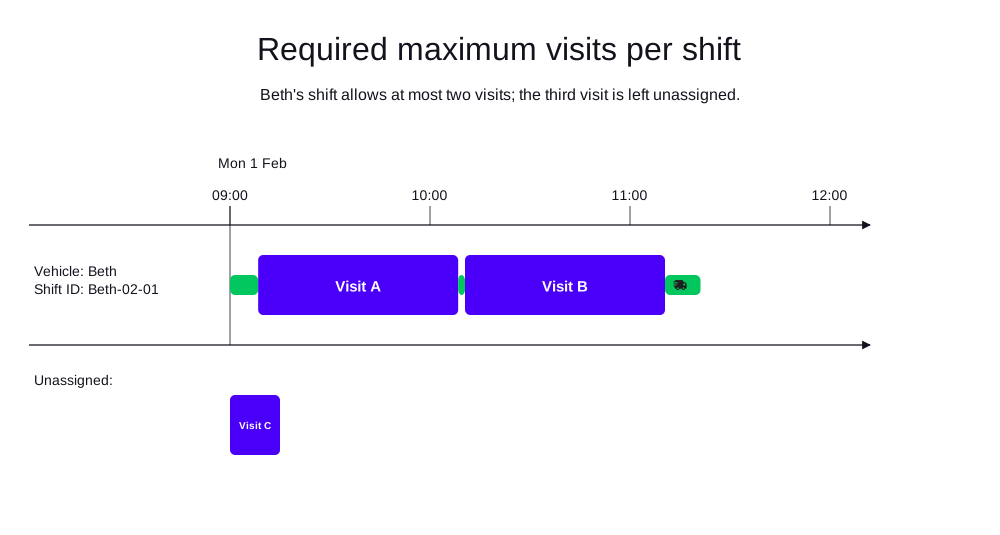
In the following example, there is one technician (Beth) with three nearby visits.
Beth’s shift has a maximum of two visits ("maxVisits": 2).
Timefold assigns only two visits to Beth and leaves the third (Visit C) unassigned, because assigning all three would exceed the shift’s maximum number of visits.
-
Input
-
Output
Try this example in Timefold Platform by saving this JSON into a file called sample.json and make the following API call:
|
curl -X POST -H "Content-type: application/json" -H 'X-API-KEY: <API_KEY>' https://app.timefold.ai/api/models/field-service-routing/v1/route-plans -d@sample.json{
"config": {
"run": {
"name": "Required maximum visits per shift example"
}
},
"modelInput": {
"vehicles": [
{
"id": "Beth",
"vehicleType": "VAN",
"shifts": [
{
"id": "Beth-02-01",
"startLocation": [33.70450, -84.34881],
"endLocation": [33.70450, -84.34881],
"minStartTime": "2027-02-01T09:00:00Z",
"maxLastVisitDepartureTime": "2027-02-01T17:00:00Z",
"maxVisits": 2
}
]
}
],
"visits": [
{
"id": "Visit A",
"location": [33.74900, -84.38800],
"serviceDuration": "PT1H"
},
{
"id": "Visit B",
"location": [33.75900, -84.37800],
"serviceDuration": "PT1H"
},
{
"id": "Visit C",
"location": [33.76900, -84.36800],
"serviceDuration": "PT1H"
}
],
"planningWindow": {
"startDate": "2027-02-01T00:00:00Z",
"endDate": "2027-02-02T00:00:00Z"
}
}
}
To request the solution, locate the ID from the response to the post operation and append it to the following API call:
|
curl -X GET -H 'X-API-KEY: <API_KEY>' https://app.timefold.ai/api/models/field-service-routing/v1/route-plans/<ID>{
"metadata": {
"id": "ID",
"originId": "ID",
"name": "Required maximum visits per shift example",
"submitDateTime": "2026-09-11T04:45:20.664454491Z",
"startDateTime": "2026-09-11T04:45:56.703873224Z",
"activeDateTime": "2026-09-11T04:45:56.804220875Z",
"completeDateTime": "2026-09-11T04:46:27.219468162Z",
"shutdownDateTime": "2026-09-11T04:46:27.219472962Z",
"solverStatus": "SOLVING_COMPLETED",
"score": "0hard/-10000medium/-1269soft",
"tags": [
"system.type:from-request",
"system.profile:Standard profile"
],
"validationResult": {
"summary": "OK"
}
},
"modelOutput": {
"vehicles": [
{
"id": "Beth",
"shifts": [
{
"id": "Beth-02-01",
"startTime": "2027-02-01T09:00:00Z",
"itinerary": [
{
"id": "Visit A",
"arrivalTime": "2027-02-01T09:08:27Z",
"startServiceTime": "2027-02-01T09:08:27Z",
"departureTime": "2027-02-01T10:08:27Z",
"effectiveServiceDuration": "PT1H",
"travelTimeFromPreviousStandstill": "PT8M27S",
"travelDistanceMetersFromPreviousStandstill": 7321,
"minStartTravelTime": "2027-02-01T00:00:00Z",
"kind": "VISIT"
},
{
"id": "Visit B",
"arrivalTime": "2027-02-01T10:10:30Z",
"startServiceTime": "2027-02-01T10:10:30Z",
"departureTime": "2027-02-01T11:10:30Z",
"effectiveServiceDuration": "PT1H",
"travelTimeFromPreviousStandstill": "PT2M3S",
"travelDistanceMetersFromPreviousStandstill": 1772,
"minStartTravelTime": "2027-02-01T00:00:00Z",
"kind": "VISIT"
}
],
"metrics": {
"totalServiceDuration": "PT2H",
"totalBreakDuration": "PT0S",
"totalWaitingTime": "PT0S",
"totalTravelTime": "PT21M9S",
"travelTimeFromStartLocationToFirstVisit": "PT8M27S",
"travelTimeBetweenVisits": "PT2M3S",
"travelTimeFromLastVisitToEndLocation": "PT10M39S",
"totalTravelDistanceMeters": 17119,
"travelDistanceFromStartLocationToFirstVisitMeters": 7321,
"travelDistanceBetweenVisitsMeters": 1772,
"travelDistanceFromLastVisitToEndLocationMeters": 8026,
"endLocationArrivalTime": "2027-02-01T11:21:09Z",
"overtime": "PT0S",
"availableOvertime": "PT0S"
}
}
],
"metrics": {
"activatedShifts": 1,
"assignedVisits": 2,
"totalShiftDuration": "PT2H21M9S",
"totalServiceDuration": "PT2H",
"totalTravelTime": "PT21M9S",
"totalTravelDistanceMeters": 17119,
"totalBreakTime": "PT0S",
"totalWaitingTime": "PT0S",
"totalOvertime": "PT0S",
"availableOvertime": "PT0S"
}
}
],
"unassignedVisits": [
"Visit C"
]
},
"inputMetrics": {
"vehicles": 1,
"vehicleShifts": 1,
"visits": 3,
"mandatoryVisits": 3,
"optionalVisits": 0,
"pinnedVisits": 0,
"visitsWithSla": 0,
"visitGroups": 0,
"visitDependencies": 0,
"excludedVisits": 0,
"movableVisits": 0
},
"kpis": {
"averageTravelTimePerVisit": "PT10M35S",
"totalTravelTime": "PT21M9S",
"travelTimeFromStartLocationToFirstVisit": "PT8M27S",
"travelTimeBetweenVisits": "PT2M3S",
"travelTimeFromLastVisitToEndLocation": "PT10M39S",
"averageTravelDistanceMetersPerVisit": 8560,
"totalTravelDistanceMeters": 17119,
"travelDistanceFromStartLocationToFirstVisitMeters": 7321,
"travelDistanceBetweenVisitsMeters": 1772,
"travelDistanceFromLastVisitToEndLocationMeters": 8026,
"totalUnassignedVisits": 1,
"totalAssignedVisits": 2,
"assignedMandatoryVisits": 2,
"unassignedMandatoryVisits": 1,
"totalActivatedVehicles": 1,
"workingTimeFairnessPercentage": 100,
"totalOvertime": "PT0S",
"availableOvertime": "PT0S"
},
"run": {
"id": "ID",
"originId": "ID",
"name": "Required maximum visits per shift example",
"submitDateTime": "2026-09-11T04:45:20.664454491Z",
"startDateTime": "2026-09-11T04:45:56.703873224Z",
"activeDateTime": "2026-09-11T04:45:56.804220875Z",
"completeDateTime": "2026-09-11T04:46:27.219468162Z",
"shutdownDateTime": "2026-09-11T04:46:27.219472962Z",
"solverStatus": "SOLVING_COMPLETED",
"score": "0hard/-10000medium/-1269soft",
"tags": [
"system.type:from-request",
"system.profile:Standard profile"
],
"validationResult": {
"summary": "OK"
}
}
}10. Preferred maximum visits per shift
A vehicle shift’s maxSoftVisits property defines the preferred maximum number of visits to be assigned to the shift.
{
  "shifts": [
    {
      "id": "Beth-02-01",
      "startLocation": [33.70450, -84.34881],
      "endLocation": [33.70450, -84.34881],
      "minStartTime": "2027-01-01T09:00:00Z",
      "maxLastVisitDepartureTime": "2027-01-01T17:00:00Z",
      "maxSoftVisits": 8
    }
  ]
}
The Max visits per shift (soft) constraint is triggered when the number of visits assigned to a vehicle shift exceeds the limit specified in maxSoftVisits.
Visits will still be assigned if they exceed this limit, but the solution is penalized proportionally to the number of visits over the limit.
If you use this soft limit in combination with a hard limit, make sure to set the soft limit (maxSoftVisits) to a lower value than the corresponding hard limit (maxVisits), otherwise the soft limit will never be reached.
|
Every soft constraint has a weight that can be configured to change the relative importance of the constraint compared to other constraints. Learn about constraint weights. |
10.1. Preferred maximum visits per shift example
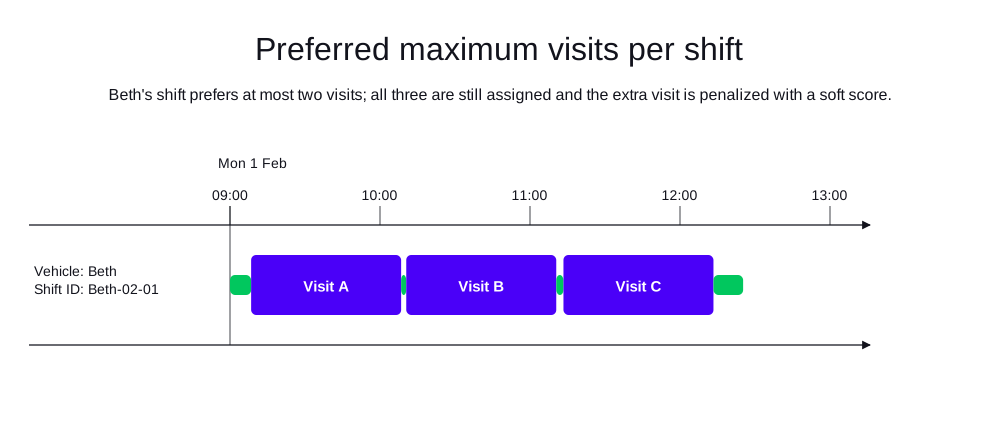
In the following example, there is one technician (Beth) with three nearby visits.
Beth’s shift has a preferred maximum of two visits ("maxSoftVisits": 2).
Timefold assigns all three visits to Beth, but the solution is penalized with a soft score because the number of visits exceeds the preferred maximum.
-
Input
-
Output
Try this example in Timefold Platform by saving this JSON into a file called sample.json and make the following API call:
|
curl -X POST -H "Content-type: application/json" -H 'X-API-KEY: <API_KEY>' https://app.timefold.ai/api/models/field-service-routing/v1/route-plans -d@sample.json{
"config": {
"run": {
"name": "Preferred maximum visits per shift example"
}
},
"modelInput": {
"vehicles": [
{
"id": "Beth",
"vehicleType": "VAN",
"shifts": [
{
"id": "Beth-02-01",
"startLocation": [33.70450, -84.34881],
"endLocation": [33.70450, -84.34881],
"minStartTime": "2027-02-01T09:00:00Z",
"maxLastVisitDepartureTime": "2027-02-01T17:00:00Z",
"maxSoftVisits": 2
}
]
}
],
"visits": [
{
"id": "Visit A",
"location": [33.74900, -84.38800],
"serviceDuration": "PT1H"
},
{
"id": "Visit B",
"location": [33.75900, -84.37800],
"serviceDuration": "PT1H"
},
{
"id": "Visit C",
"location": [33.76900, -84.36800],
"serviceDuration": "PT1H"
}
],
"planningWindow": {
"startDate": "2027-02-01T00:00:00Z",
"endDate": "2027-02-02T00:00:00Z"
}
}
}
To request the solution, locate the ID from the response to the post operation and append it to the following API call:
|
curl -X GET -H 'X-API-KEY: <API_KEY>' https://app.timefold.ai/api/models/field-service-routing/v1/route-plans/<ID>{
"metadata": {
"id": "ID",
"originId": "ID",
"name": "Preferred maximum visits per shift example",
"submitDateTime": "2026-09-11T04:45:00.458696914Z",
"startDateTime": "2026-09-11T04:45:56.864215169Z",
"activeDateTime": "2026-09-11T04:45:56.982343948Z",
"completeDateTime": "2026-09-11T04:46:27.464766194Z",
"shutdownDateTime": "2026-09-11T04:46:27.464771459Z",
"solverStatus": "SOLVING_COMPLETED",
"score": "0hard/0medium/-5115soft",
"tags": [
"system.type:from-request",
"system.profile:Standard profile"
],
"validationResult": {
"summary": "OK"
}
},
"modelOutput": {
"vehicles": [
{
"id": "Beth",
"shifts": [
{
"id": "Beth-02-01",
"startTime": "2027-02-01T09:00:00Z",
"itinerary": [
{
"id": "Visit A",
"arrivalTime": "2027-02-01T09:08:27Z",
"startServiceTime": "2027-02-01T09:08:27Z",
"departureTime": "2027-02-01T10:08:27Z",
"effectiveServiceDuration": "PT1H",
"travelTimeFromPreviousStandstill": "PT8M27S",
"travelDistanceMetersFromPreviousStandstill": 7321,
"minStartTravelTime": "2027-02-01T00:00:00Z",
"kind": "VISIT"
},
{
"id": "Visit B",
"arrivalTime": "2027-02-01T10:10:30Z",
"startServiceTime": "2027-02-01T10:10:30Z",
"departureTime": "2027-02-01T11:10:30Z",
"effectiveServiceDuration": "PT1H",
"travelTimeFromPreviousStandstill": "PT2M3S",
"travelDistanceMetersFromPreviousStandstill": 1772,
"minStartTravelTime": "2027-02-01T00:00:00Z",
"kind": "VISIT"
},
{
"id": "Visit C",
"arrivalTime": "2027-02-01T11:13:23Z",
"startServiceTime": "2027-02-01T11:13:23Z",
"departureTime": "2027-02-01T12:13:23Z",
"effectiveServiceDuration": "PT1H",
"travelTimeFromPreviousStandstill": "PT2M53S",
"travelDistanceMetersFromPreviousStandstill": 1971,
"minStartTravelTime": "2027-02-01T00:00:00Z",
"kind": "VISIT"
}
],
"metrics": {
"totalServiceDuration": "PT3H",
"totalBreakDuration": "PT0S",
"totalWaitingTime": "PT0S",
"totalTravelTime": "PT25M15S",
"travelTimeFromStartLocationToFirstVisit": "PT8M27S",
"travelTimeBetweenVisits": "PT4M56S",
"travelTimeFromLastVisitToEndLocation": "PT11M52S",
"totalTravelDistanceMeters": 19885,
"travelDistanceFromStartLocationToFirstVisitMeters": 7321,
"travelDistanceBetweenVisitsMeters": 3743,
"travelDistanceFromLastVisitToEndLocationMeters": 8821,
"endLocationArrivalTime": "2027-02-01T12:25:15Z",
"overtime": "PT0S",
"availableOvertime": "PT0S"
}
}
],
"metrics": {
"activatedShifts": 1,
"assignedVisits": 3,
"totalShiftDuration": "PT3H25M15S",
"totalServiceDuration": "PT3H",
"totalTravelTime": "PT25M15S",
"totalTravelDistanceMeters": 19885,
"totalBreakTime": "PT0S",
"totalWaitingTime": "PT0S",
"totalOvertime": "PT0S",
"availableOvertime": "PT0S"
}
}
],
"unassignedVisits": []
},
"inputMetrics": {
"vehicles": 1,
"vehicleShifts": 1,
"visits": 3,
"mandatoryVisits": 3,
"optionalVisits": 0,
"pinnedVisits": 0,
"visitsWithSla": 0,
"visitGroups": 0,
"visitDependencies": 0,
"excludedVisits": 0,
"movableVisits": 0
},
"kpis": {
"averageTravelTimePerVisit": "PT8M25S",
"totalTravelTime": "PT25M15S",
"travelTimeFromStartLocationToFirstVisit": "PT8M27S",
"travelTimeBetweenVisits": "PT4M56S",
"travelTimeFromLastVisitToEndLocation": "PT11M52S",
"averageTravelDistanceMetersPerVisit": 6628,
"totalTravelDistanceMeters": 19885,
"travelDistanceFromStartLocationToFirstVisitMeters": 7321,
"travelDistanceBetweenVisitsMeters": 3743,
"travelDistanceFromLastVisitToEndLocationMeters": 8821,
"totalUnassignedVisits": 0,
"totalAssignedVisits": 3,
"assignedMandatoryVisits": 3,
"unassignedMandatoryVisits": 0,
"totalActivatedVehicles": 1,
"workingTimeFairnessPercentage": 100,
"totalOvertime": "PT0S",
"availableOvertime": "PT0S"
},
"run": {
"id": "ID",
"originId": "ID",
"name": "Preferred maximum visits per shift example",
"submitDateTime": "2026-09-11T04:45:00.458696914Z",
"startDateTime": "2026-09-11T04:45:56.864215169Z",
"activeDateTime": "2026-09-11T04:45:56.982343948Z",
"completeDateTime": "2026-09-11T04:46:27.464766194Z",
"shutdownDateTime": "2026-09-11T04:46:27.464771459Z",
"solverStatus": "SOLVING_COMPLETED",
"score": "0hard/0medium/-5115soft",
"tags": [
"system.type:from-request",
"system.profile:Standard profile"
],
"validationResult": {
"summary": "OK"
}
}
}11. Required reachable itineraries and visits
Every vehicle shift itinerary needs to represent a route that is reachable on the map. For instance, a vehicle shift starting on an island cannot be assigned a visit located on the mainland.
In case a vehicle shift itinerary contains an unreachable route, it gets penalized with a hard score penalty by one or both of the following constraints:
-
Require reachable itineraries: Penalizes a vehicle shift itinerary that contains an unreachable route caused by an unreachable visit, break, or shift end location. -
Require reachable visits: Penalizes a visit which is unreachable from the location of the previous visit in the itinerary or the vehicle shift start location (in the case of the first visit in the itinerary).
The model output elements VehicleShiftPlan, VisitPlan and BreakPlan contain the unreachable boolean attribute indicating:
-
VehicleShiftPlan.unreachable = true: The vehicle shift itinerary contains a route between two locations that is unreachable on the map, such a route can be:-
From the vehicle shift start location to the first visit or break with location.
-
From a break with location to the next break with location or the next visit.
-
From a visit to the next break with location or the next visit.
-
From the last visit or break with location to the vehicle shift end location.
-
-
VisitPlan.unreachable = true: The previous itinerary item is unreachable or the route from the previous visit, location break, or vehicle shift start to the visit location is not reachable on the map. -
BreakPlan.unreachable = true: The previous itinerary item is unreachable or the route from the previous visit, location break, or vehicle shift start to the break location is not reachable on the map.
The unreachable attribute is omitted when false to avoid increasing payload size.
Example of model output containing an unreachable route to Visit A and Break B in a vehicle shift itinerary:
{
  "shifts": [
    {
      "id": "Ann - Monday",
      "itinerary": [
        {
          "id": "Visit A",
          "kind": "VISIT",
          "unreachable": true
        },
        {
          "id": "Break B",
          "kind": "BREAK",
          "startTime": "2026-01-12T14:00:00-04:00",
          "endTime": "2026-01-12T15:00:00-04:00",
          "unreachable": true
        }
      ],
      "unreachable": true
    }
  ]
}
Next
-
See the full API spec, try the online API, or start a free trial.
-
Learn more about field service routing from our YouTube playlist.
-
Read Skills to learn how to avoid scheduling overqualified technicians for a job.