Skills and risk factors
Making sure the correct employees are assigned to the correct shifts is an important factor in employee shift scheduling.
Different shifts require different skills. For instance, a hospital requires nurses in the ICU to be trained in ICU procedures.
In other cases, skills might just be preferred but not required. An event looking for volunteers might prefer volunteers who have first-aid training over volunteers who don’t, but will also accept volunteers without first-aid training.
Risk factors are also an important consideration in employee shift scheduling. If an employee has a compromised immune system, scheduling them to work in an environment where they might be exposed to COVID-19 would be a risk.
This guide explains skills and risk factors with the following examples:
1. Assigning employees with required skills
Learn how to configure an API Key to run the examples in this guide:
In the examples, replace |
Employees can include skills that are used to determine if they should be assigned to shifts.
{
  "id": "Beth",
  "skills": [
    {
      "id": "Security"
    }
  ]
}
Shifts also include the skills that are required of the person who will be assigned to the shift.
{
  "shifts": [
    {
      "id": "Tue Sec",
      "start": "2027-02-02T00:00:00Z",
      "end": "2027-02-02T08:00:00Z",
      "requiredSkills": [
        "Security"
      ]
    }
  ]
}
Skills can be limited, so that they only apply for specific times by adding validityDateTimeSpans:
{
  "id": "Beth",
  "skills": [
    {
      "id": "Security",
      "validityDateTimeSpans": [
        {
          "start": "2027-02-01T00:00:00Z",
          "end": "2027-02-02T00:00:00Z"
        }
      ]
    }
  ]
}
1.1. Assigning employees with required skills example
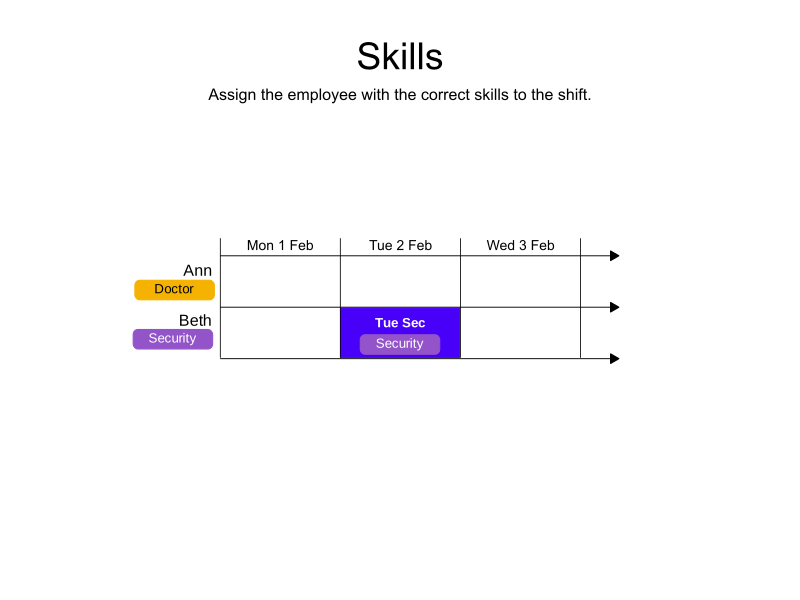
In the following example, Ann and Beth are both available for the shift, however, only Beth has the required security skill.
-
Input
-
Output
Try this example in Timefold Platform by saving this JSON into a file called sample.json and make the following API call:
|
curl -X POST -H "Content-type: application/json" -H 'X-API-KEY: <API_KEY>' https://app.timefold.ai/api/models/employee-scheduling/v1/schedules -d@sample.json
{
  "config": {
    "run": {
      "name": "Skills: required skill example"
    }
  },
  "modelInput": {
    "employees": [
      {
        "id": "Ann",
        "skills": [
          {
            "id": "Doctor"
          }
        ]
      },
      {
        "id": "Beth",
        "skills": [
          {
            "id": "Security"
          }
        ]
      }
    ],
    "shifts": [
      {
        "id": "Tue Sec",
        "start": "2027-02-02T08:00:00Z",
        "end": "2027-02-02T16:00:00Z",
        "requiredSkills": [
          "Security"
        ]
      }
    ]
  }
}| To request the solution, locate the 'ID' from the response to the post operation and append it to the following API call: |
curl -X GET -H 'X-API-KEY: <API_KEY>' https://app.timefold.ai/api/models/employee-scheduling/v1/schedules/<ID>
{
  "metadata": {
    "id": "ID",
    "name": "Skills: required skill example",
    "submitDateTime": "2025-02-19T07:59:36.850272829Z",
    "startDateTime": "2025-02-19T07:59:42.88054275Z",
    "activeDateTime": "2025-02-19T07:59:42.93678946Z",
    "completeDateTime": "2025-02-19T08:04:43.16445426Z",
    "shutdownDateTime": "2025-02-19T08:04:43.307088825Z",
    "solverStatus": "SOLVING_COMPLETED",
    "score": "0hard/0medium/0soft",
    "tags": [
      "system.profile:default"
    ],
    "validationResult": {
      "summary": "OK"
    }
  },
  "modelOutput": {
    "shifts": [
      {
        "id": "Tue Sec",
        "employee": "Beth"
      }
    ]
  },
  "kpis": {
    "assignedShifts": 1,
    "unassignedShifts": 0,
    "workingTimeFairnessPercentage": null,
    "disruptionPercentage": 0.0,
    "averageDurationOfEmployeesPreferencesMet": null,
    "minimumDurationOfPreferencesMetAcrossEmployees": null,
    "averageDurationOfEmployeesUnpreferencesViolated": null,
    "maximumDurationOfUnpreferencesViolatedAcrossEmployees": null
  }
}
modelOutput contains the schedule with Beth assigned to the security shift.
2. Assigning employees with multiple skills
Shifts and employees can both have multiple shifts that must be matched for an assignment to be made.
2.1. Assigning employees with multiple skills example
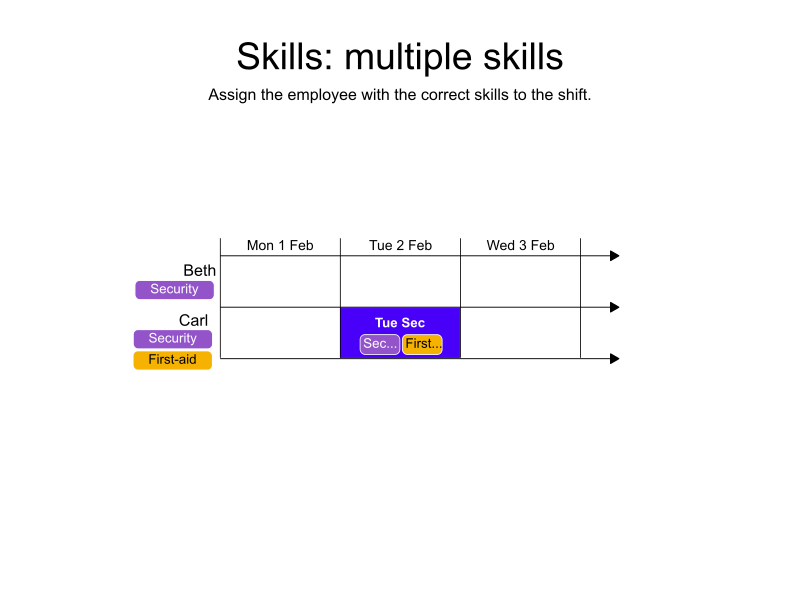
In the following example, Beth and Carl are both available for a shift. The shift has two required skills, security and first-aid.
Beth and Carl both have the security skill, but only Carl has the security skill and the first-aid skill.
-
Input
-
Output
Try this example in Timefold Platform by saving this JSON into a file called sample.json and make the following API call:
|
curl -X POST -H "Content-type: application/json" -H 'X-API-KEY: <API_KEY>' https://app.timefold.ai/api/models/employee-scheduling/v1/schedules -d@sample.json
{
  "config": {
    "run": {
      "name": "Skills: multiple skills example"
    }
  },
  "modelInput": {
    "employees": [
      {
        "id": "Beth",
        "skills": [
          {
            "id": "Security"
          }
        ]
      },
      {
        "id": "Carl",
        "skills": [
          {
            "id": "Security"
          },
          {
            "id": "First-aid"
          }
        ]
      }
    ],
    "shifts": [
      {
        "id": "Tue Sec",
        "start": "2027-02-02T08:00:00Z",
        "end": "2027-02-02T16:00:00Z",
        "requiredSkills": [
          "Security", "First-aid"
        ]
      }
    ]
  }
}| To request the solution, locate the 'ID' from the response to the post operation and append it to the following API call: |
curl -X GET -H 'X-API-KEY: <API_KEY>' https://app.timefold.ai/api/models/employee-scheduling/v1/schedules/<ID>
{
  "metadata": {
    "id": "ID",
    "name": "Skills: multiple skills example",
    "submitDateTime": "2025-02-19T08:30:28.178931158Z",
    "startDateTime": "2025-02-19T08:30:34.190480064Z",
    "activeDateTime": "2025-02-19T08:30:34.318230242Z",
    "completeDateTime": "2025-02-19T08:35:34.533973055Z",
    "shutdownDateTime": "2025-02-19T08:35:34.764465774Z",
    "solverStatus": "SOLVING_COMPLETED",
    "score": "0hard/0medium/0soft",
    "tags": [
      "system.profile:default"
    ],
    "validationResult": {
      "summary": "OK"
    }
  },
  "modelOutput": {
    "shifts": [
      {
        "id": "Tue Sec",
        "employee": "Carl"
      }
    ]
  },
  "kpis": {
    "assignedShifts": 1,
    "unassignedShifts": 0,
    "workingTimeFairnessPercentage": null,
    "disruptionPercentage": 0.0,
    "averageDurationOfEmployeesPreferencesMet": null,
    "minimumDurationOfPreferencesMetAcrossEmployees": null,
    "averageDurationOfEmployeesUnpreferencesViolated": null,
    "maximumDurationOfUnpreferencesViolatedAcrossEmployees": null
  }
}
modelOutput contains the schedule with Carl assigned to the shift that requires the skills security and first-aid.
3. Skill matching strategies
By default, when a shift requires multiple skills, an employee must have all the required skills to be assigned to that shift. However, in some scenarios, you may want to assign an employee who has at least one of the required skills.
The requiredSkillsMatchKind and preferredSkillsMatchKind fields control how skills are matched:
-
MATCH_ALL(default): Employee must have ALL specified skills -
MATCH_ANY: Employee must have AT LEAST ONE of the specified skills
3.1. Match all skills (default)
This is the default behavior. When a shift requires multiple skills, the assigned employee must have all of them. requiredSkillsMatchKind can be omitted as it defaults to MATCH_ALL.
{
  "shifts": [
    {
      "id": "ICU Morning",
      "start": "2027-02-02T06:00:00Z",
      "end": "2027-02-02T14:00:00Z",
      "requiredSkills": ["ICU-Certification", "ACLS"],
      "requiredSkillsMatchKind": "MATCH_ALL"
    }
  ]
}
In this example, a nurse must have ICU certification AND Advanced Cardiovascular Life Support (ACLS) certification to work this intensive care unit shift.
3.2. Match any skill
When flexibility is needed, you can use MATCH_ANY to assign employees who have at least one of the specified skills.
{
  "shifts": [
    {
      "id": "Emergency Department",
      "start": "2027-02-02T09:00:00Z",
      "end": "2027-02-02T17:00:00Z",
      "requiredSkills": ["Emergency-Medicine", "Trauma-Certification", "Critical-Care"],
      "requiredSkillsMatchKind": "MATCH_ANY"
    }
  ]
}
In this example, a healthcare professional with ANY of the three specializations (Emergency Medicine OR Trauma Certification OR Critical Care) can be assigned to this emergency department shift. This provides flexibility when staffing the ED, as different specialists can cover the role.
4. Assigning employees with preferred skills
When skills are only preferred and employees without the skill can still be assigned, they are included as preferredSkills:
requiredSkills and preferredSkills can both be included in the same shifts or used separately.
{
  "shifts": [
    {
      "id": "Tue Sec",
      "start": "2027-02-02T08:00:00Z",
      "end": "2027-02-02T16:00:00Z",
      "preferredSkills": [
        "First-aid"
      ]
    }
  ]
}
4.1. Assigning employees with preferred skills example
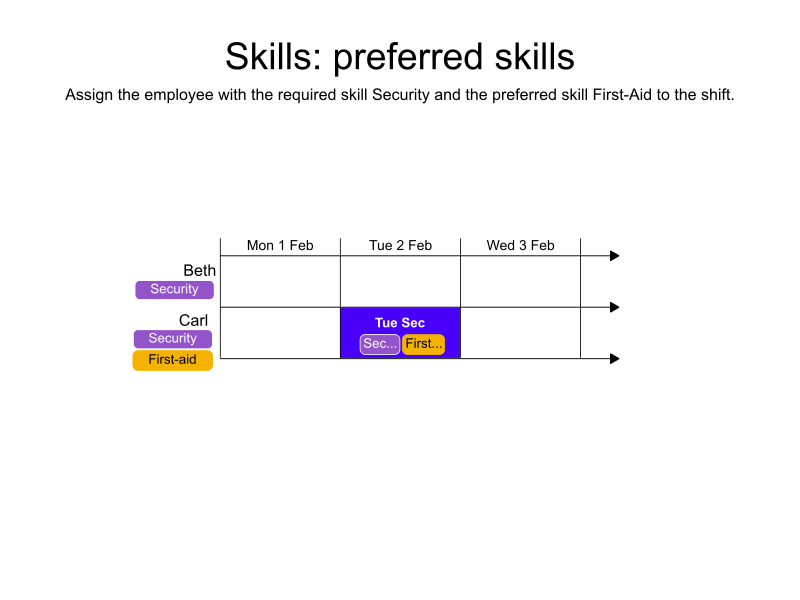
In the following example, Beth and Carl both have the required security skill, but only Carl has the preferred first-aid skill.
-
Input
-
Output
Try this example in Timefold Platform by saving this JSON into a file called sample.json and make the following API call:
|
curl -X POST -H "Content-type: application/json" -H 'X-API-KEY: <API_KEY>' https://app.timefold.ai/api/models/employee-scheduling/v1/schedules -d@sample.json
{
  "config": {
    "run": {
      "name": "Skills: preferred skills example"
    }
  },
  "modelInput": {
    "employees": [
      {
        "id": "Beth",
        "skills": [
          {
            "id": "Security"
          }
        ]
      },
      {
        "id": "Carl",
        "skills": [
          {
            "id": "Security"
          },
          {
            "id": "First-aid"
          }
        ]
      }
    ],
    "shifts": [
      {
        "id": "Tue Sec",
        "start": "2027-02-02T08:00:00Z",
        "end": "2027-02-02T16:00:00Z",
        "requiredSkills": [
          "Security"
        ],
        "preferredSkills": [
          "First-aid"
        ]
      }
    ]
  }
}| To request the solution, locate the 'ID' from the response to the post operation and append it to the following API call: |
curl -X GET -H 'X-API-KEY: <API_KEY>' https://app.timefold.ai/api/models/employee-scheduling/v1/schedules/<ID>
{
  "metadata": {
    "id": "ID",
    "name": "Skills: preferred skills example",
    "submitDateTime": "2025-02-20T06:57:28.217023617Z",
    "startDateTime": "2025-02-20T06:57:38.305320329Z",
    "activeDateTime": "2025-02-20T06:57:38.447753272Z",
    "completeDateTime": "2025-02-20T07:02:38.832848935Z",
    "shutdownDateTime": "2025-02-20T07:02:39.016900039Z",
    "solverStatus": "SOLVING_COMPLETED",
    "score": "0hard/0medium/0soft",
    "tags": [
      "system.profile:default"
    ],
    "validationResult": {
      "summary": "OK"
    }
  },
  "modelOutput": {
    "shifts": [
      {
        "id": "Tue Sec",
        "employee": "Carl"
      }
    ]
  },
  "kpis": {
    "assignedShifts": 1,
    "unassignedShifts": 0,
    "workingTimeFairnessPercentage": null,
    "disruptionPercentage": 0.0,
    "averageDurationOfEmployeesPreferencesMet": null,
    "minimumDurationOfPreferencesMetAcrossEmployees": null,
    "averageDurationOfEmployeesUnpreferencesViolated": null,
    "maximumDurationOfUnpreferencesViolatedAcrossEmployees": null
  }
}
modelOutput contains the schedule with Carl assigned to the shift.
5. Skills expressions
Skills expressions allow for a complex set of skill requirements and preferences to be set. For example, a shift may require either a person that can do blood work or apply first aid, but they must also have a resuscitation skill.
requiredSkillsExpression are defined in shifts:
{
  "shifts": [
    {
      "id": "Tue Sec",
      "start": "2027-02-02T08:00:00Z",
      "end": "2027-02-02T16:00:00Z",
      "requiredSkillsExpression": {
        "type": "NODE",
        "operator": "AND",
        "operands": [
          {
            "type": "LEAF",
            "skillId": "resuscitation"
          },
          {
            "type": "NODE",
            "operator": "OR",
            "operands": [
              {
                "type": "LEAF",
                "skillId": "blood work"
              },
              {
                "type": "LEAF",
                "skillId": "first aid"
              }
            ]
          }
        ]
      }
    }
  ]
}
requiredSkillsExpression expects a node.
This node has the ability to evaluate its operands based on its operator and therefor has three fields:
-
typeto specify it is aNODE. -
operatorto specify how theoperandswill be evaluated, asANDorOR. -
operandsto specify a list of operands. An operands type can either beNODEorLEAF.
NODE creates nested AND/OR structures.
LEAF has two fields:
-
typeto specify it isLEAF. -
skillIdto specify a skill’s ID.
We set the maximum depth of nodes to two, i.e. `requiredSkillsExpression` is allowed to specify a `SkillOperandNode` as an operand, but that node isn't allowed to specify other nodes as operands.
A shift object can either define a required skills expression or required skills.
They cannot be used at the same time for a shift, but they can be used across multiple shifts, i.e. shift1 has required skills, shift2 has a required skills expression.
This also applies to preferred skills and preferred skill expressions.
6. Risk factors
When employees have risk factors, it’s important not to expose them to those risks.
Employees can define prohibitedRiskFactors:
{
  "id": "Carl",
  "prohibitedRiskFactors": [
    "Covid-19"
  ]
}
The risks associated with a shift are defined in riskFactors:
{
  "shifts": [
    {
      "id": "Tue Sec",
      "start": "2027-02-02T08:00:00Z",
      "end": "2027-02-02T16:00:00Z",
      "riskFactors": [
        "Covid-19"
      ]
    }
  ]
}
6.1. Risk factors example
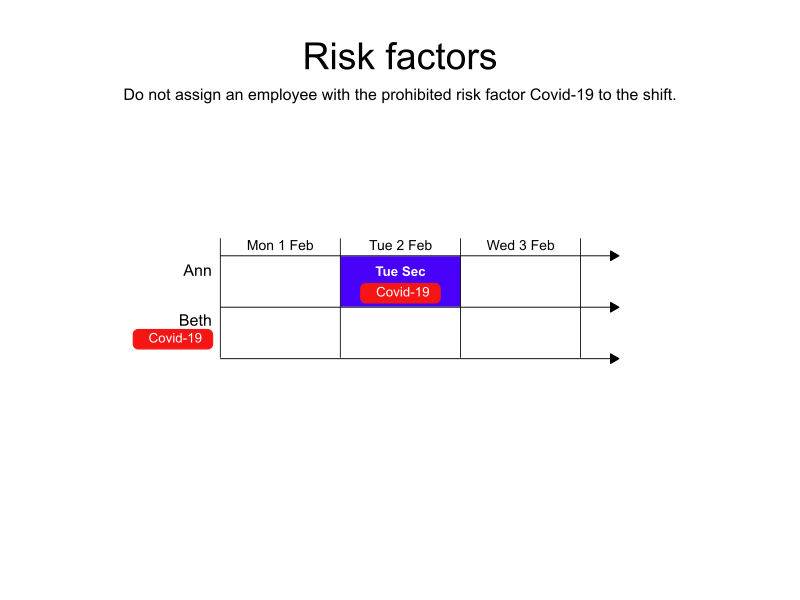
In the following example, Beth and Carl both have the required skill security, but only Carl has the preferred skill first-aid, however, Carl has a prohibited risk factor for COVID-19.
The shift is assigned to Beth.
-
Input
-
Output
Try this example in Timefold Platform by saving this JSON into a file called sample.json and make the following API call:
|
curl -X POST -H "Content-type: application/json" -H 'X-API-KEY: <API_KEY>' https://app.timefold.ai/api/models/employee-scheduling/v1/schedules -d@sample.json
{
  "config": {
    "run": {
      "name": "Risk factors example"
    }
  },
  "modelInput": {
    "employees": [
      {
        "id": "Beth",
        "skills": [
          {
            "id": "security"
          }
        ]
      },
      {
        "id": "Carl",
        "skills": [
          {
            "id": "Security"
          },
          {
            "id": "First-aid"
          }
        ],
        "prohibitedRiskFactors": [
          "Covid-19"
        ]
      }
    ],
    "shifts": [
      {
        "id": "Tue Sec",
        "start": "2027-02-02T08:00:00Z",
        "end": "2027-02-02T16:00:00Z",
        "requiredSkills": [
          "Security"
        ],
        "preferredSkills": [
          "First-aid"
        ],
        "riskFactors": [
          "Covid-19"
        ]
      }
    ]
  }
}| To request the solution, locate the 'ID' from the response to the post operation and append it to the following API call: |
curl -X GET -H 'X-API-KEY: <API_KEY>' https://app.timefold.ai/api/models/employee-scheduling/v1/schedules/<ID>
{
  "metadata": {
    "id": "ID",
    "name": "Risk factors example",
    "submitDateTime": "2025-02-20T07:21:29.749994031Z",
    "startDateTime": "2025-02-20T07:21:39.712315225Z",
    "activeDateTime": "2025-02-20T07:21:39.846012595Z",
    "completeDateTime": "2025-02-20T07:26:40.223992857Z",
    "shutdownDateTime": "2025-02-20T07:26:40.435553658Z",
    "solverStatus": "SOLVING_COMPLETED",
    "score": "0hard/0medium/-480soft",
    "tags": [
      "system.profile:default"
    ],
    "validationResult": {
      "summary": "OK"
    }
  },
  "modelOutput": {
    "shifts": [
      {
        "id": "Tue Sec",
        "employee": "Beth"
      }
    ]
  },
  "kpis": {
    "assignedShifts": 1,
    "unassignedShifts": 0,
    "workingTimeFairnessPercentage": null,
    "disruptionPercentage": 0.0,
    "averageDurationOfEmployeesPreferencesMet": null,
    "minimumDurationOfPreferencesMetAcrossEmployees": null,
    "averageDurationOfEmployeesUnpreferencesViolated": null,
    "maximumDurationOfUnpreferencesViolatedAcrossEmployees": null
  }
}
modelOutput contains the schedule with Beth assigned to the shift.
Next
-
See the full API spec or try the online API.
-
Learn more about employee shift scheduling from our YouTube playlist.
-
Manage Employee availability.